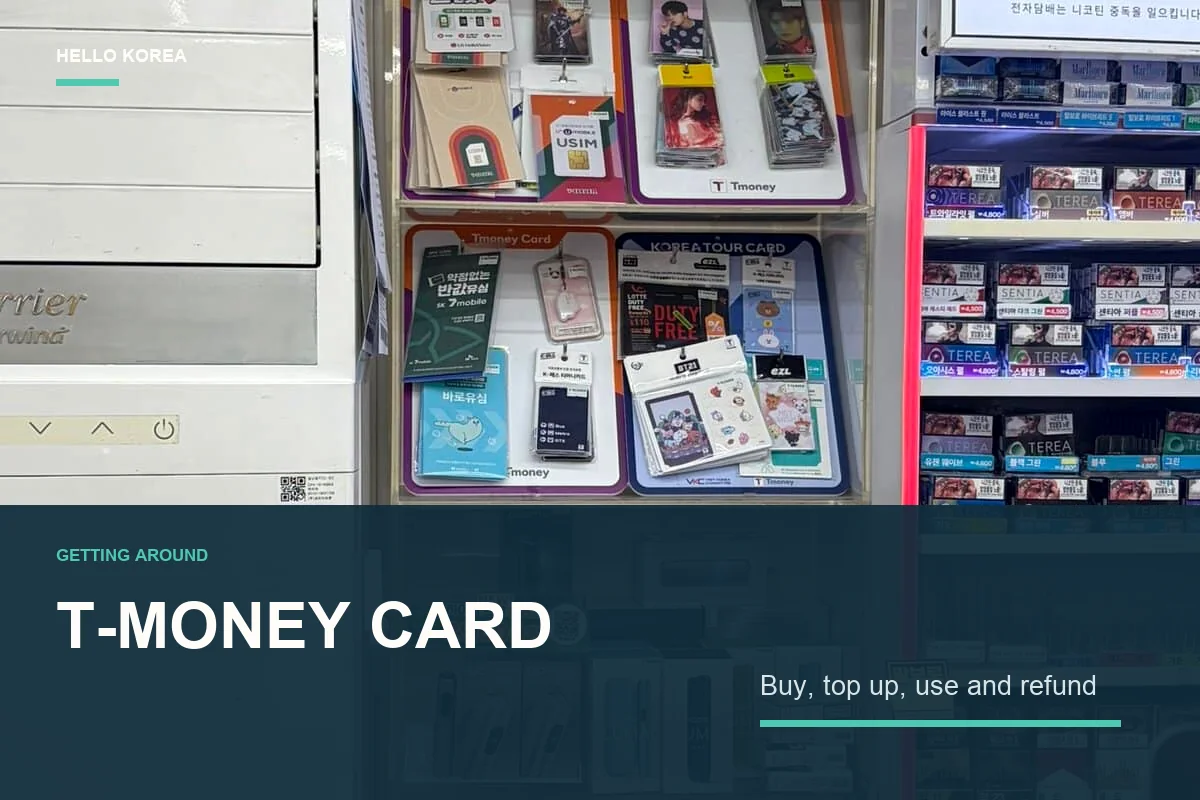
Landing in Korea is easy; working out how to pay for your first subway or bus ride can be less obvious. A T-money card in Korea is one of the simplest ways for most visitors to get started with public transport.
T-money is a reloadable transit card that you tap when using the subway, buses, and other supported services. If this is your first Seoul subway ride, our Seoul subway guide covers directions, transfers and exits.
This guide follows the order you will actually use it:
buy → top up → subway → bus → transfer → iPhone → refund
It combines official guidance with photos taken at a Seoul convenience store, subway station, ticket kiosk, fare gate, and bus in August 2026. When something was confirmed only on one machine rather than as a system-wide rule, that distinction is made clear.
Quick answer: For the simplest start, buy a physical T-money card and top it up with Korean won cash before your first ride. How much does a T-money card cost? Prices vary by card and seller, but one Seoul Metro kiosk checked in August 2026 sold a Tmoney Eco-friendly Transit Card for ₩4,000. The card price does not include your transportation balance, which must be loaded separately. Physical prepaid T-money and mobile T-money use different top-up systems. If you use an iPhone, Apple Wallet T-money is available on supported devices, while MobileTmoney offers a separate top-up route for certain overseas-issued cards. Before leaving, check the refund limits by store: the remaining balance and the card purchase price are treated separately.
What is a T-money card?
T-money is a prepaid transportation card. You add money first and then tap the card on a reader when using public transport.
Visitors mainly use it for:
- Seoul subway and city buses
- Public transport in many other Korean cities
- Some taxis
- Some convenience stores and other T-money merchants
For a Seoul trip, it saves you from buying a single-journey subway ticket each time.
It can also keep eligible bus and subway journeys within the Seoul metropolitan integrated-fare system when you transfer correctly.
1. Where to buy a T-money card
Buy one at a convenience store
A convenience store is one of the easiest places to find a physical T-money card.
Look near the counter or at a dedicated transportation-card display. You may see standard cards, character designs, and other travel-related cards together.
Card designs, prices, and stock vary by shop.
If you do not see one, you can ask:
“T-money card isseoyo?” — “Do you have a T-money card?”

Buy one at a Seoul subway Ticket Kiosk
Convenience stores are not the only option.
At one Seoul Metro Ticket Kiosk checked in August 2026, the English Purchase transportation card screen listed:
Tmoney Eco-friendly Transit card — ₩4,000- Climate Card products
- Some products marked
SOLD OUT
That confirms that this particular machine sold T-money at that time.
It does not mean every station, kiosk, or date will have the same card, price, or stock.

2. How Much Does a T-money Card Cost?
T-money card prices vary depending on the card design and where you buy it. At one Seoul Metro Ticket Kiosk checked in August 2026, a Tmoney Eco-friendly Transit Card was listed at ₩4,000.
This was the price shown on that specific machine at that time, so you should not assume that every T-money card in Korea costs exactly ₩4,000. Convenience stores may sell different designs at different prices, and character or special-edition cards can cost more.
There is one important detail for first-time visitors:
The price of the physical T-money card and the money available for transportation are separate.
For example, buying a T-money card for ₩4,000 does not mean that the card already contains ₩4,000 of subway or bus credit.
After buying the card, you need to add a separate balance before using it for transportation.
Think of your starting cost as:
T-money card price + transportation balance
Example: If your card costs ₩4,000 and you load ₩20,000 for transportation, you will pay ₩24,000 in total. The ₩20,000 becomes your usable transit balance; the ₩4,000 is the cost of the card itself.
3. Topping up a physical T-money card: bring Korean won cash
Korea is extremely card-friendly, so it is natural to assume that you can also top up a physical T-money card with a credit card.
For a standard physical prepaid T-money card, however, Korean won cash is the safest and simplest option.
Seoul Metro has introduced newer ticket kiosks that support credit-card payments, but Seoul’s official kiosk guidance says that prepaid transportation-card reloads continue to use the existing cash method.
So, seeing a credit-card reader on a new subway kiosk does not mean you can use an overseas Visa or Mastercard to add value to an ordinary physical T-money card.
The confusion comes from the fact that the same machines may handle several different transportation products.
- Physical prepaid T-money reload → Korean won cash
- Single-journey ticket → card payment available on supported newer kiosks
- Short-term Climate Card → separate payment rules
- Apple T-money / MobileTmoney → separate mobile top-up methods
From 2026, Seoul also expanded international-card payment on newer machines for single-journey tickets and eligible short-term Climate Cards.
That overseas-card support should not be assumed to apply to ordinary physical T-money reloads.
Practical tip: If you plan to use a physical T-money card, keep some Korean won cash ready for top-ups.
4. How to top up T-money at a Seoul subway station
Step 1. Find a Ticket Kiosk

Look for a transportation-card Ticket Kiosk inside the subway station.
The Seoul Metro kiosk photographed for this guide had a screen along with a credit-card reader, banknote and coin slots, and a marked transit-card reload area.
Machines can look different, but if a language button is available, switching to English makes the process much easier.

Step 2. Switch to English
On the English screen of the kiosk checked for this guide, the available menu included:
Single Journey TicketReloading the transit cardPurchase transportation cardRefund / Ticket type change / Reuse
If you already have a T-money card, choose Reloading the transit card.
If you want to check whether a new transportation card is available, choose Purchase transportation card.
Menu names and language support can differ between machines.

Step 3. Place your card on the reload area
After choosing the reload option, the machine may ask you to place your transportation card on the marked reload area.
Leave the card there and follow the instructions on the screen.
For a standard physical prepaid T-money card, select the amount and insert Korean won cash when instructed.
Do not remove the card before the transaction is complete.

5. How to use T-money on the Seoul subway
Once your card has a balance, go to the subway fare gate.
Tap your T-money card on the transportation-card reader.
Entering the subway → tap
Leaving at your destination → tap again
Use the same card or mobile T-money device when entering and leaving so that the system can correctly calculate your journey.
When changing subway lines, follow the transfer signs inside the station.
For navigation and exit numbers, see our guide to using NAVER Map in Korea.


6. On a bus, tap when you get on and when you get off
Most visitors remember to tap the card reader near the driver when boarding.
The easy step to forget is the exit tap.
On Seoul metropolitan buses, tap when you board and tap again at the reader near the exit when you leave.
This is especially important if you plan to transfer to another bus or the subway.
The easiest rule to remember is:
Bus = tap in + tap out

7. How Seoul metropolitan transfers work
Eligible trips can combine buses and subways under the Seoul metropolitan integrated-fare system.
- bus → subway
- subway → bus
- bus → bus
After tapping out of the previous ride, board the next eligible service within:
| Time of day | Transfer window |
|---|---|
| Normal hours | Within 30 minutes |
| 21:00 to 07:00 the next day | Within 60 minutes |
The system allows up to four transfers, for five boardings in total.
Do not think of this as unlimited free transfers. Depending on total distance and the transportation services used, additional fare can still be charged.
Boarding the same vehicle or the same route again is generally excluded from the transfer benefit.
The bus exit tap matters because it records where the previous ride ended.
8. Can two people share one T-money card?
For the simplest subway and transfer experience, use one T-money card per person.
One card can sometimes be used to pay for multiple passengers on a bus, but special conditions apply.
For example, the passengers generally need to board and leave together, and the same arrangement does not provide normal subway-transfer convenience.
For a first-time visitor, the easiest rule is:
one person = one transit card
9. How to check your T-money balance
Your remaining balance may appear on the screen when you tap at a subway gate or bus reader.
You can also check the balance at a transportation-card reload machine.
There is no need to add a very large amount on your first day.
Start with a practical amount and top up again when the balance gets low.
10. iPhone users can use Apple Wallet T-money
Apple and Tmoney launched T-money for Apple Pay on July 21, 2025.
With a supported iPhone or Apple Watch, you can add a prepaid T-money card to Apple Wallet and use your device at transportation-card readers without carrying a physical card.
Apple’s published minimum requirements include:
- iPhone Xs, iPhone XR, or later with iOS 17.2 or later
- Apple Watch Series 6 or later, or Apple Watch SE (2nd generation) or later, with watchOS 10.2 or later
With Express Mode, you can tap your device without first unlocking it or opening Wallet.
See Apple’s T-money announcement for current setup details.
11. Can you top up Apple T-money with a foreign card?
This is one of the most important distinctions for international visitors.
Adding money directly in Apple Wallet and adding money through the MobileTmoney app are different payment routes.
Top up directly in Apple Wallet
Apple says that adding money directly to T-money in Apple Wallet, including Auto Reload, requires a credit or debit card issued in South Korea.
A foreign Visa or Mastercard already stored in Apple Wallet does not automatically become eligible for T-money reloads.
Apple’s Korea issuer list checked in August 2026 listed Hyundai Card.
Issuer support can change, so check Apple’s current participating issuer list before relying on this method.
Top up through the MobileTmoney app
MobileTmoney provides a separate app-based reload route.
Its iOS App Store release notes list overseas-issued cards from:
- Mastercard
- American Express
- UnionPay
- JCB
For a supported iPhone user, the basic flow is:
Add T-money to Apple Wallet → top up through MobileTmoney → tap with iPhone or Apple Watch
Being on the supported card-brand list does not guarantee payment approval.
Your issuing bank, country, and card settings may still cause a transaction to be declined.
Visa is not listed in the relevant MobileTmoney App Store release notes checked for this guide.
Check the MobileTmoney App Store listing before your trip.
12. Physical T-money vs Apple T-money
| Physical T-money | Apple Wallet T-money | |
|---|---|---|
| What you need | A physical card | A supported iPhone or Apple Watch |
| How you use it | Tap the card | Tap your iPhone or Apple Watch |
| Top-up for visitors | Korean won cash for standard physical-card reloads | Apple Wallet or MobileTmoney, depending on the payment method |
| Battery | Not relevant | Device condition matters |
| Setup | Almost none | Initial Wallet and payment setup required |
| Best for | Visitors who want the simplest setup | Supported-device users who want transit on one device |
If you want the most straightforward option after arriving in Korea, a physical T-money card is easier.
If you have a supported Apple device and a compatible top-up method, Apple T-money can be very convenient.
13. T-money or the Climate Card?
You may see both T-money and the Climate Card on the same Seoul subway kiosk.
| T-money | Climate Card short-term tourist pass | |
|---|---|---|
| Basic model | Pay as you travel | Time-based transit pass |
| Travel scope | Useful across many Korean cities | Primarily Seoul-area services; check eligible routes |
| Best for | Flexible or multi-city itineraries | Visitors making many eligible Seoul rides in a short period |
If you plan to take public transport very frequently while staying mainly in Seoul, the Climate Card may be worth comparing. We break down the prices, break-even point and coverage limits in Climate Card vs T-money.
If your itinerary is flexible or includes other Korean cities, T-money is usually the simpler starting point.
October 2026 update: This comparison refers to the tourist Climate Card passes for 1, 2, 3, 5 or 7 days. Seoul’s Climate Card Plus announcement says these short-term passes remain available, while the previous monthly service has been replaced by a separate refund scheme with Seoul-resident eligibility for its benefits. Do not assume that buying a tourist pass gives you those monthly benefits. Check current routes and payment conditions before purchase.
14. How to Refund Your T-money Balance Before Leaving Korea
For a working physical T-money card, choose a refund counter based on the balance left on the card. Participating convenience stores return the remaining balance in Korean won cash minus a ₩500 fee. The card purchase price is not refunded.
| Refund location | Balance accepted | Fee |
|---|---|---|
| GS25 | Under ₩20,000 | ₩500 |
| 7-Eleven | ₩20,000 or less | ₩500 |
| CU or emart24 | ₩30,000 or less | ₩500 |
Exactly ₩20,000 left? That exceeds GS25’s “under ₩20,000” limit. Ask at a participating 7-Eleven, CU or emart24 instead. The limits refer to the balance before the fee; a ₩10,000 balance returns ₩9,500.
At the counter
Ask whether the store handles T-money balance refunds, then hand over your card. You can show: 티머니 잔액 환불해 주세요. (“Please refund my T-money balance.”) Check the cash returned and collect your card. For a small balance, buying something at a shop that accepts T-money may be more useful than paying the refund fee.
If your balance exceeds the store limit
Tmoney also lists metropolitan subway customer information centers as refund locations. Its English guide describes partial refunds at subway Tmoney service centers and Tmoney Town for standard plate cards: ₩10,000–₩50,000, in ₩10,000 units. Ask staff which service is available; a kiosk’s “Refund” menu alone does not establish that it refunds an ordinary T-money balance.
For a balance over ₩50,000, Tmoney’s Korean guide directs users to its headquarters or an eligible bank ATM. ATM refunds require an account in your own name at the relevant bank, so they are not a straightforward option for most short-term visitors. Tmoney Town is at Seoul City Tower, 1F, near Seoul Station Exit 10. Check current requirements before making a special trip.
Tmoney Town has separate rules: identity details are checked for refunds of ₩50,000 or more, and refunds of ₩100,000 or more are paid into a bank account after 18:00 on the following working day. Its Korean guide lists no fee up to a cumulative ₩500,000 per month, then a 1% fee above that threshold. Do not assume a large refund will be immediate cash.
Before your last journey
Top up small amounts near the end of your trip. Keep enough balance for any final journey you plan to pay for with T-money, or arrange another ticket before refunding. Check a suitable counter in advance instead of relying on finding one just before your flight.
These instructions cover a working physical T-money card. Apple Wallet/MobileTmoney, damaged cards and the Climate Card have different procedures. Do not apply the physical-card refund table to a mobile balance.
Official refund rules checked October 2, 2026: Tmoney normal-card refund guide (Korean) and Tmoney foreigner guide (English). This section is based on official guidance, not a newly completed refund test.
For heavy luggage, rain or a journey after the last subway, a taxi may be worth considering. See our Kakao T vs k.ride guide to check app setup, payment options and your pickup point before you need a ride.
First-time visitor checklist
- Buy a physical T-money card at a convenience store or an available Ticket Kiosk.
- Remember that the card purchase price and travel balance are separate.
- Keep Korean won cash ready for standard physical T-money top-ups.
- Tap when entering and leaving the subway.
- Tap when boarding and leaving the bus.
- For a transfer, board again within 30 minutes, or within 60 minutes from 21:00 to 07:00.
- If you use an iPhone, distinguish Apple Wallet’s Korea-issued-card requirement from the MobileTmoney overseas-card route.
FAQ
Can tourists buy a T-money card?
Yes. Convenience stores are one of the easiest places to find one.
The August 2026 field observation in this guide also shows T-money being sold on one Seoul Metro Ticket Kiosk.
Availability and stock vary by station and machine.
How much does a T-money card cost?
It depends on the card type and seller.
At one Seoul Metro kiosk checked in August 2026, the Tmoney Eco-friendly Transit card was listed at ₩4,000.
The physical card price and the loaded transit balance are separate.
Can I top up a physical T-money card with a credit card?
For a standard physical prepaid T-money card at Seoul subway reload machines, prepare Korean won cash.
New Seoul Metro kiosks support credit-card payments for several other transportation products, but official guidance says prepaid transportation-card reloads continue to use the existing cash method.
Do not confuse this with single-journey tickets, eligible Climate Card products, or Apple T-money and MobileTmoney, which follow different payment rules.
Do Seoul subway ticket machines have English?
The Seoul Metro Ticket Kiosk checked for this guide did.
It included Reloading the transit card and Purchase transportation card options.
Other machines may have different interfaces.
Do I need to tap out of the bus?
Yes. Tap again when leaving, especially if you plan to transfer to another bus or the subway.
How long do I have to transfer?
Usually, you have 30 minutes after tapping out.
From 21:00 until 07:00 the next day, the transfer window is 60 minutes.
The maximum is four transfers and five boardings in total.
Can two people use one T-money card?
For subway rides and transfers, one card per person is the simplest choice.
Multi-passenger payment on buses has separate conditions and should not be treated the same as normal individual T-money use.
Can I top up T-money on an iPhone with a foreign card?
Not directly through Apple Wallet.
Apple says that route requires a Korea-issued debit or credit card.
MobileTmoney’s iOS release notes separately list Mastercard, American Express, UnionPay, and JCB for certain overseas-issued-card top-ups, subject to issuer approval and other conditions.
Can I use a T-money card bought in Seoul in Busan?
Yes. Busan Transportation Corporation lists T-money among the transportation cards accepted for Busan urban rail and local bus transfers, so you can keep using the same physical card you bought in Seoul.
For a confirmed reload option in Busan, use a transportation-card ticket or reload machine inside an urban-rail station. The official reload instructions describe cash reloads with banknotes or coins, and the ticket guide lists station transport-card machines and convenience stores as purchase locations. The Seoul Climate Card is different: its official service area covers Seoul and specified nearby routes, not Busan.
Official sources
- Apple: T-money for Apple Pay
- Apple Pay participating issuer list
- MobileTmoney App Store listing
- Seoul Metropolitan Government: Transfer Rules
- Seoul Metropolitan Government: Overseas Card Payment at Ticket Machines
For a broader travel setup, see our guide to the best Korea travel apps for first-time travelers.

Leave a Reply