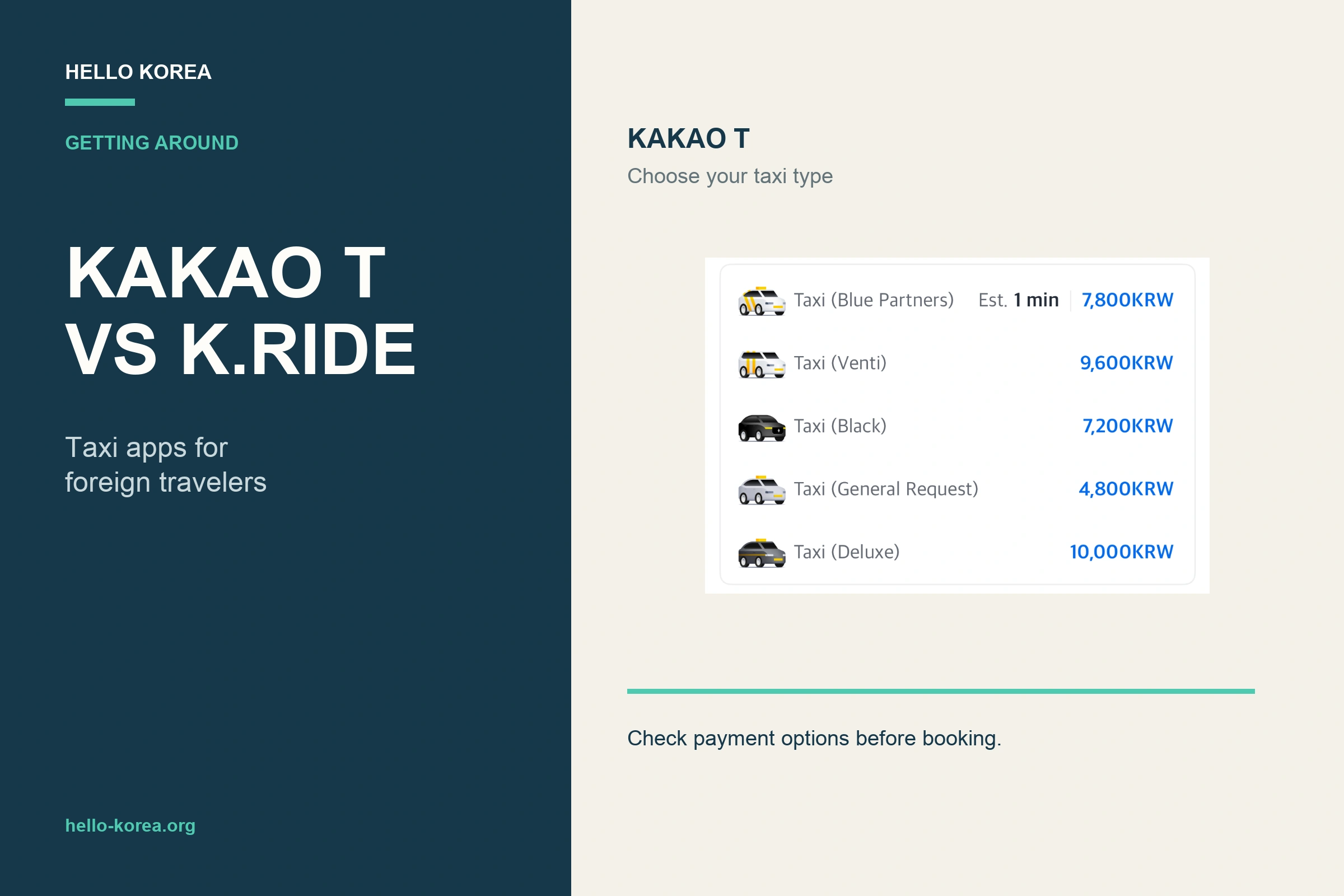
Quick answer: First trip to Korea and no Kakao account? Use k.ride. Already have Kakao T working with your card? Keep using it. Either way, do these three things before you fly:
- Sign up and search your hotel. k.ride lets you sign up with Google, Apple, email or a phone number. After sign-up, search for your hotel to make sure you can reach the ride-request screen.
- Register your card — all the way. Don’t stop at seeing the Visa/Mastercard logo. Finish registration and confirm the card is accepted. If it fails, check whether Kakao T offers Pay to the driver for your selected taxi type (we saw it under General Request on October 8, 2026), or set up your backup app now.
- Request from where a taxi can stop. Find the exact entrance in NAVER Map, drop the pickup pin on a road (not inside a building), and match the license plate before getting in.
Stuck? Jump to what to do if your ride request doesn’t work.
When choosing between Kakao T and k.ride, the important question is not simply which taxi app is better.
You usually need a taxi at the least convenient moment: after a late flight, in heavy rain, with several suitcases, or after the last subway has stopped running. That is not when you want to discover that your account is not verified, your card will not register, or your pickup pin is in the wrong place.
This guide goes beyond comparing the two apps. It shows you how to choose an app, set it up before your trip, request a taxi from a hotel or attraction, and recover when a ride request does not work.
Screenshot note: The original app screens in this guide were checked in August 2026. Additional Kakao T payment screens were checked on an iPhone on October 8, 2026; these checks did not include card registration success, a taxi request, a ride, or payment. Available options can vary by taxi service, app version, account, payment method, country, and location.
Kakao T vs k.ride at a glance
| Feature | k.ride | Kakao T |
|---|---|---|
| Main audience | Designed with international travelers in mind | Korea’s general mobility app |
| Sign-up options | Google, Apple, email, phone number | Primarily based on a Kakao account |
| Languages | English, Japanese, Simplified and Traditional Chinese; additional languages for destination search and translated chat | English interface available |
| International payment | Foreign-issued cards and multiple payment options | Supported foreign cards and direct-payment options may be available |
| Best for | First-time visitors to Korea | Travelers who already use Kakao and have Kakao T working |
This does not mean k.ride is always the better app.
k.ride has an advantage for international travelers because its sign-up, language, and payment options are easier to understand from the start. Kakao T, meanwhile, is Kakao Mobility’s main domestic mobility app and is widely used in Korea.
What matters most is not which app is more popular, but which one actually works on your phone before you need a ride.
Which app should you set up first?
Start with k.ride if you…
- are visiting Korea for the first time;
- prefer signing up with Google, Apple, email, or a phone number;
- want an interface designed for international travelers;
- want to check foreign-card and international payment options first; or
- do not want to set up a Kakao account just to request a taxi.
For many first-time visitors, the main advantage of k.ride is simple: international sign-up, language support, and payment options are built into the experience from the beginning.
Kakao T may be easier if you…
- already have and use a Kakao account;
- have already completed Kakao T verification;
- can see a supported payment method or Pay to the driver option in your app; or
- want to use Kakao Mobility’s widely used domestic taxi app.
If Kakao T is already working properly for you, there is no need to install another app simply because k.ride is aimed at international travelers.
For the full pre-trip setup, see our Korea travel apps checklist.
If you have an important airport transfer, a late-night journey, or another ride where a delay would be stressful, however, having a second app ready as a backup can be useful.
Payment approval, phone verification, available vehicle types, and dispatch availability can vary by account, card, country, app version, time, and location. The goal is not to find an app that works for everyone. It is to have one working taxi-request method on your own phone before you need it.
Spend 10 minutes setting it up before your trip
1. Do not stop after sign-up: search for a destination
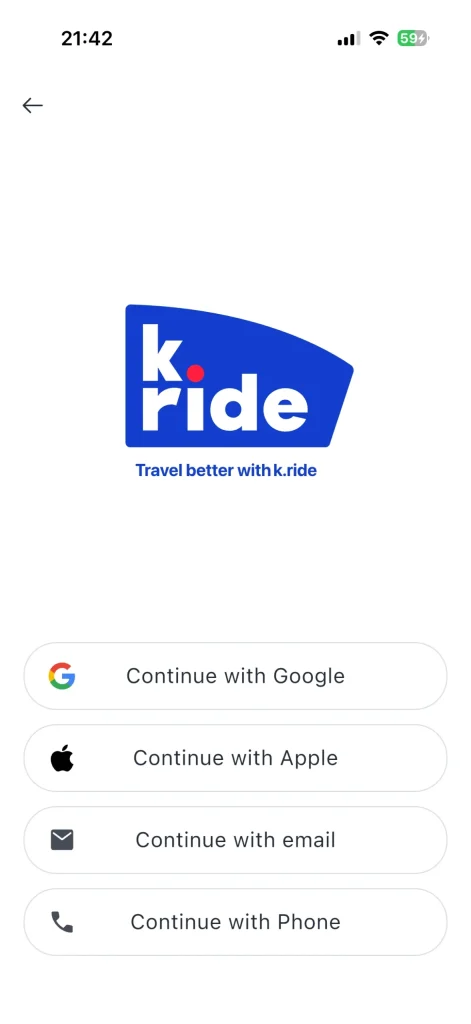
On the k.ride sign-up screen we checked, Google, Apple, email, and phone-number options were available.
After creating your account, do not close the app immediately. Search for your hotel or a well-known attraction in Korea.
Successfully creating an account is not enough. You want to know that you can actually find a destination and reach the ride-request screen.
If you plan to use Kakao T, check your Kakao account, phone verification, and payment screens in advance as well.
Trying to complete first-time verification after landing can be inconvenient when you are depending on airport Wi-Fi, roaming, or an unfamiliar phone-number setup.
2. Do not just check the card logo: complete payment registration
Kakao Mobility says k.ride supports foreign-issued cards and several international payment methods.
On the payment screen we checked, PayPal, international cards, and multiple mobile-payment options were visible.
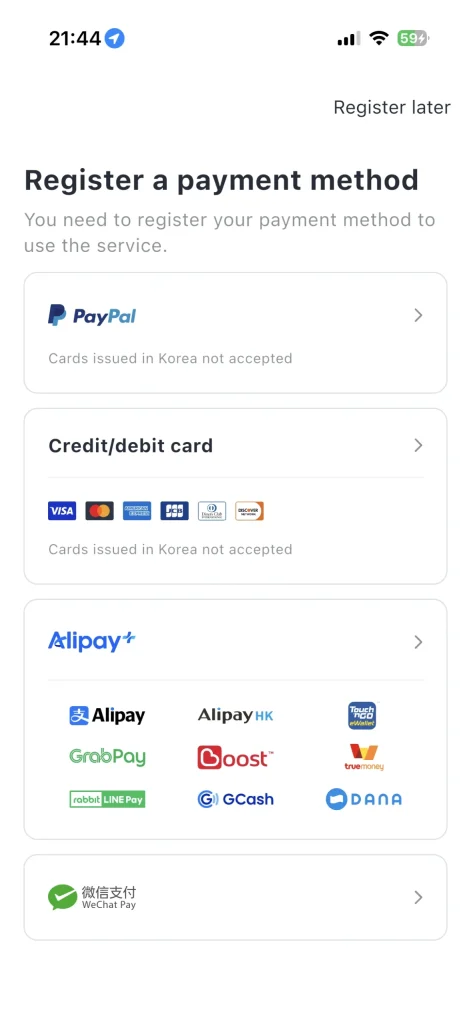
The important test is not whether your card brand appears on the screen.
Try to complete the registration process and confirm that the card is actually accepted.
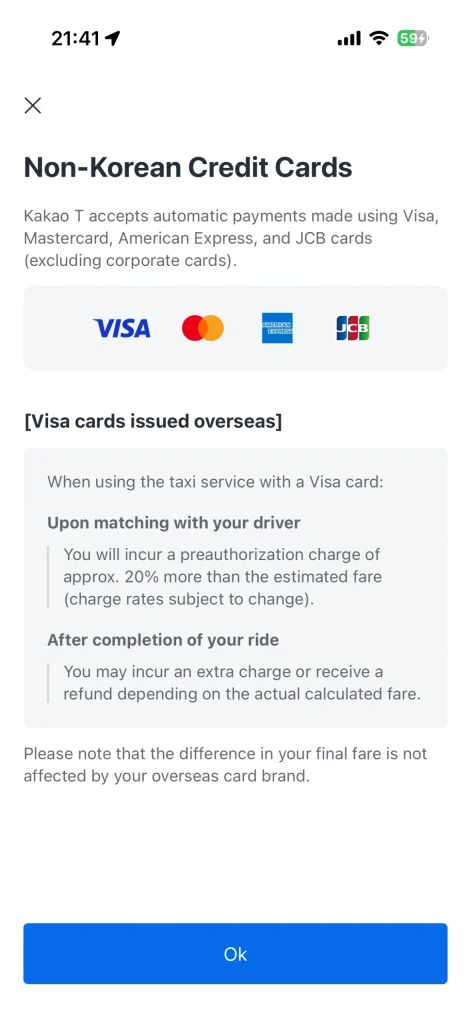
Our August 2026 Kakao T screenshots below show foreign-card information and a direct-payment option. See the October 8, 2026 check below for the difference between General Request and Blue Partners.
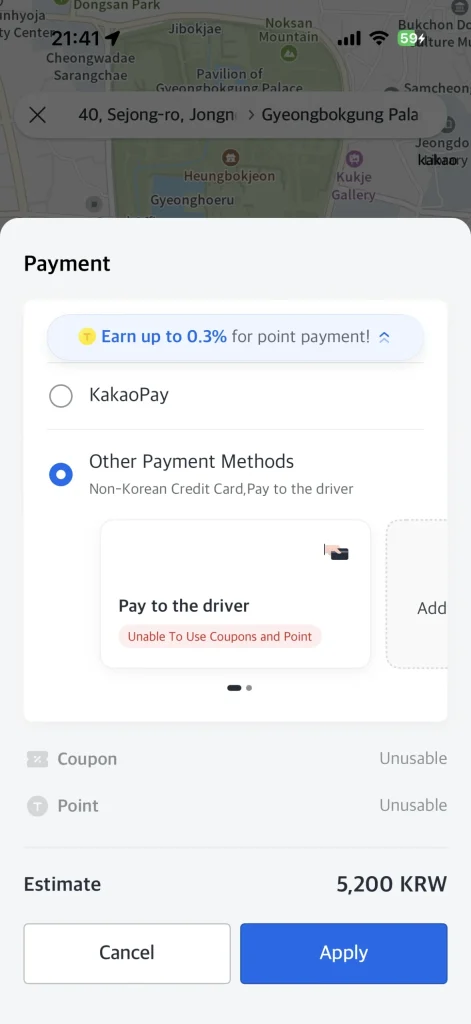
Hands-on check: October 8, 2026 (iPhone)
We compared the payment screens for two Kakao T taxi types. General Request displayed both Non-Korean Credit Card and Pay to the driver. Blue Partners displayed Non-Korean Credit Card, but Pay to the driver was not shown. This finding applies to the screens we checked; it does not establish that direct payment is available or unavailable across all taxi types, accounts or booking conditions.
To look for direct payment, select General Request in the taxi-type list, then open the payment options and check for Pay to the driver before booking.


The Non-Korean Credit Cards notice stated that Kakao T supports automatic payments using Visa, Mastercard, American Express and JCB, excluding corporate cards. For Visa cards issued overseas, the notice described a preauthorization upon driver matching of approximately 20% more than the estimated fare (rates subject to change), followed by an additional charge or refund according to the actual fare after the ride. We read this notice; we did not test the authorization or settlement.

Test limits: We checked menu visibility and the in-app guidance only. We did not verify successful card registration or an actual foreign-card authorization, request a taxi, take a ride, or complete a final payment. A displayed payment option is not proof that a particular card or transaction will succeed. Screenshots are cropped to omit location and unrelated details.
If you get stuck at this stage, do not wait until your airport-transfer day. Set up your backup option while you still have time.
How to request a taxi from a hotel or attraction
1. Find the destination and exit in NAVER Map first
Before opening the taxi app, look up your hotel, restaurant, or attraction in NAVER Map.
If the English name is difficult to find, copy the Korean place name instead.
At large places such as Gyeongbokgung Palace, major shopping malls, or train stations, do not stop at the general place name. Check which exit, entrance, or roadside pickup point you are actually using.
If you are not familiar with Korean map apps, see our guide to using NAVER Map in Korea.
2. Put the pickup pin where a taxi can actually stop
A blue GPS dot shows your estimated position; it does not tell you whether a taxi can safely stop there. Check the actual roadside pickup point before requesting a ride. For map search and routing limits, see our Google Maps guide for Korea.
One common reason a pickup becomes confusing is that the pin is inside a building, in a pedestrian area, across a divided road, or somewhere a taxi cannot legally stop.
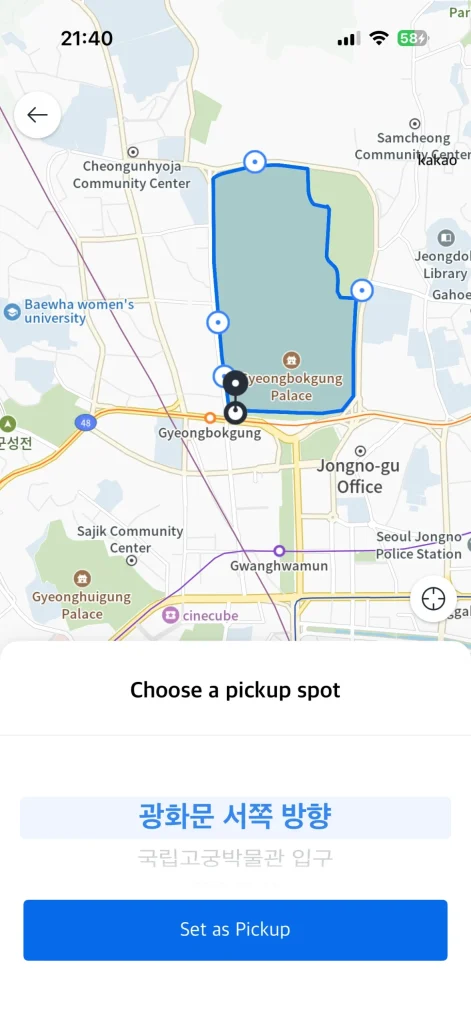
| Where you are | A better pickup point |
|---|---|
| Hotel | Main lobby driveway or vehicle entrance |
| Subway station | Roadside near a specific exit number |
| Palace or large attraction | Main gate or nearby main road |
| Shopping mall | Taxi stand or main vehicle entrance |
| Narrow alley | Walk to the nearest larger road |
If the pin lands on the opposite side of the road or inside a large complex, fix it before requesting the taxi.
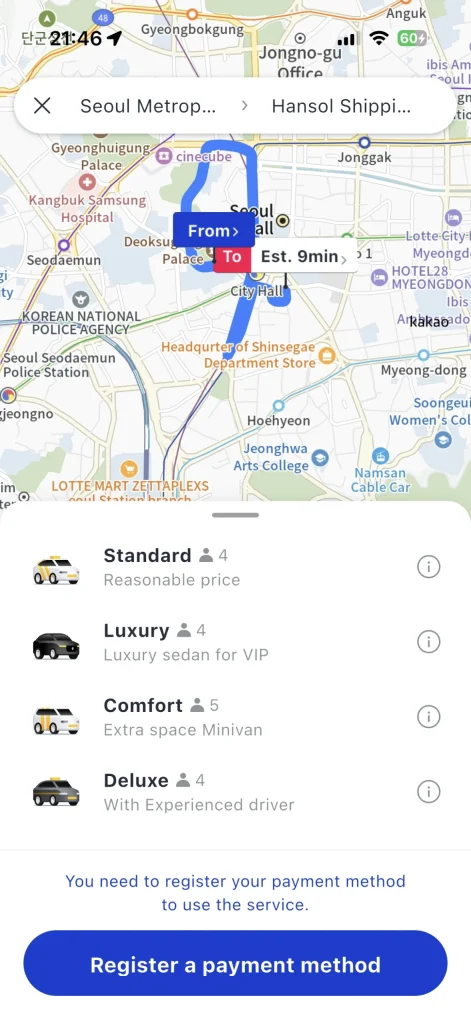
3. Check the vehicle type and estimated fare
Before confirming the ride, check the destination, available vehicle types, and estimated fare shown in the app.

Payment options can differ by taxi type. In our October 8, 2026 check, Pay to the driver was shown for General Request but not for Blue Partners. Recheck the payment menu after choosing your taxi type.
If several people are traveling together or you have large suitcases, do not choose only by the lowest displayed price. Make sure the vehicle can actually fit the passengers and luggage.
4. Match the license plate before getting in
When the taxi arrives, compare the license plate shown in the app with the vehicle in front of you.
This is especially useful at hotels, stations, and other places where several taxis may be waiting at the same time.
If needed, briefly confirm your destination before getting in.
Do you need to call a taxi app at Incheon Airport?
Not necessarily.
Incheon Airport has official taxi stands, so in many cases simply going to the designated taxi area may be easier than requesting a car through an app.
An app can still be useful if you want to check the destination and estimated fare in advance or request a specific Kakao Mobility service.
If you use an app at the airport, pay close attention to your terminal, exit number, and designated pickup location.
Before choosing a pickup point, check Incheon Airport’s official taxi guide for your terminal and taxi category. Follow the signs to the designated taxi stand, or the pickup instructions for a pre-booked ride.
If your ride request does not work, try these steps in order
Foreign card declined or payment registration fails
Check the error message and ask your card issuer whether it blocked an overseas online payment or verification. Try another payment method actually offered in your app. A card logo on the payment screen is not proof that your particular card has been approved.
In Kakao T, use Pay to the driver only if it is offered for the ride you are requesting. In our October 8, 2026 iPhone check, it appeared under General Request but was not displayed for Blue Partners. If you do not see it, check General Request in the taxi-type list and reopen the payment options before booking. This is a screen-level observation, not a guarantee for every account or ride. Confirm how you will pay before travelling and carry Korean won as a fallback. Do not assume k.ride has the same direct-payment option. If registration still fails, use a working backup app or ask hotel staff to arrange a taxi.
Sign-up or verification code does not work
Check the selected country code and the number you entered. If the app requests an SMS code, confirm that the relevant phone line can receive messages; a data-only travel eSIM does not itself provide SMS service. Follow any retry timer shown in the app. For email verification, check your spam folder.
Kakao Mobility lists Google, Apple and email sign-up for k.ride, but that does not guarantee every foreign number or account will pass every check. Use an alternative sign-in method only when the app offers it, or contact its support. If you cannot complete setup before a time-sensitive journey, use a taxi stand or ask your accommodation for help.
The driver cannot find you or you cannot explain the pickup
Send a short message with the exact hotel entrance, station exit or taxi stand, and stay at that agreed location. For example: “I am outside Exit 3, beside the taxi stand.” k.ride’s official guide describes automatic translation for driver chat. Check that the translated message still contains the correct exit number and place name.
Keep the Korean destination name and address ready in NAVER Map. If you need to move to a safer or reachable pickup point, tell the driver through the app first. Check the plate number before getting in. Before switching apps, check whether the original ride is still active and read any cancellation charge shown.
Official feature information checked October 2, 2026 against Kakao Mobility and VISITKOREA. The original app screenshots were checked in August 2026, with an additional Kakao T payment-screen check on iPhone on October 8, 2026. Neither check proves that every overseas card or phone number works.
If setup works but no taxi is assigned
1. Move the pickup pin
Underground areas, narrow alleys, pedestrian zones, and locations deep inside large buildings can be difficult for taxis to reach.
Move toward a main road, main entrance, or taxi stand and try again.
2. Recheck payment and available vehicle types
Your payment setup may not be complete, or the vehicle category you selected may have limited availability nearby.
Check your payment status and the other vehicle options currently shown in the app.
3. Check the first request, then open your backup app
If the trip is time-sensitive, such as an airport or train connection, you can check your backup app.
First make sure the original request has failed or been cancelled.
Do not confirm two rides at the same time, or you may end up requesting two taxis.
Also remember that k.ride and Kakao T share parts of Kakao Mobility’s taxi-service network.
This means switching apps may help if your problem is related to account setup or payment. But if the real problem is simply that there are very few available taxis nearby, switching apps may not solve it.
4. Ask for local help or switch to public transport
If necessary, show the pickup point on your map to hotel, café, or restaurant staff and ask where taxis normally stop.
If you are already near a subway station and do not have much luggage, the subway or bus may be faster and more predictable.
Taxi or public transport?
| Situation | Usually worth considering first |
|---|---|
| Daytime, solo, destination near a station | Subway or bus |
| Heavy luggage or heavy rain | Taxi |
| Late night or after the last subway | Taxi |
| Three or four people traveling together | Compare taxi fare with the group’s total public-transport cost |
| Airport with several large suitcases | Compare taxi with the airport limousine bus based on your hotel location |
If you decide to use public transport, see our T-money guide for subway and bus basics. For the subway itself, see the Seoul subway guide.
FAQ
Can foreign visitors use Kakao T?
Yes, there are sign-up and payment paths available to international visitors.
The Korea Tourism Organization also lists Kakao T and k.ride among taxi-hailing options for travelers.
However, the exact verification and payment process can depend on your Kakao account, phone number, card, and current app conditions. Check your own payment or direct-payment options before your trip.
Does k.ride accept foreign-issued cards?
Kakao Mobility says k.ride supports cards issued outside Korea as well as selected international payment methods.
However, seeing your card type in the app does not guarantee approval. The issuer and country can still affect the result.
Complete registration before departure if possible.
Do Kakao T and k.ride use the same drivers?
k.ride is operated by Kakao Mobility and officially provides access to services including Kakao T Blue, Venti, Black, and deluxe taxis in Korea.
The taxi-service networks therefore overlap.
However, Kakao Mobility does not publicly state that the two apps always use an identical driver pool, dispatch algorithm, or priority.
If one request fails, checking the other app can be reasonable, but do not assume the other app will automatically find a taxi faster.
Do I need both apps?
Usually, no.
One app that you have actually set up and tested is better than two apps you have never used.
If a missed ride would cause a serious problem (for example, a late-night airport transfer), keeping the other app ready as a backup can still be useful.
Last check before you leave
- [ ] I completed sign-up in at least one taxi app.
- [ ] I checked card registration or a direct-payment option.
- [ ] I searched for my hotel and at least one destination.
- [ ] I saved important Korean place names.
- [ ] I checked the pickup exit for large stations or attractions.
- [ ] I have a backup plan for any time-sensitive ride.
The important question is not whether Kakao T or k.ride is more popular.
What matters is having one taxi-request method that actually works on your phone before you need it.

Leave a Reply