Children visiting Korea can get discounted fares on a physical T-money card without a Korean phone number. Register the card with your child’s date of birth before the first ride. Adding money to the card won’t activate the discount.
The easiest time to do this is when you buy the card at a participating convenience store. Ask the cashier to register the child fare, and have your child’s passport ready. If you already have a card, you can use T-money’s non-member website or visit one of the stores or station customer centers below.
Which age group applies?
| Age in full years | Fare category | What to prepare |
|---|---|---|
| 6–12 | Child | Each child’s own card and correct birth date |
| 13–18 | Youth | Each teenager’s own card and correct birth date |
| 19 and over | Standard adult category | Do not use a younger family member’s discounted card |
The fare is based on your child’s age, not their school grade. It changes automatically as they get older, using the birth date already registered on the card. Some regional services have different rules.
For a Seoul subway trip of up to 10 km, T-money fares are ₩550 for children, ₩900 for youth and ₩1,550 for adults. Longer journeys and services with extra charges can cost more. An airport trip or a longer journey may cost more even when the discount is working. T-money’s official English child-fare guide.
For children under six, check the rules for the train or bus you’ll be taking. KTX, intercity coaches and airport services may use different age policies.
Where to register: store, station or online?
| Route | What you need | Best use |
|---|---|---|
| GS25, CU, 7-Eleven or emart24 | The physical card and the child’s birth date; bring their passport as proof of age. | Ask for registration while buying the card, before the first ride. |
| Listed subway customer center | The card and proof of the child’s birth date. | T-money lists Seoul-area Lines 1–8 and Incheon Lines 1–2. Ask at the staffed customer center. |
| T-money website, non-member route | Card number and the rider’s birth date. No account or Korean phone number is needed. | Registering a card you already own. The desktop site may ask you to install security software. |
At a station, go to the staffed customer center. A top-up machine won’t register the discount. The supported stores and subway lines are listed in T-money’s registration guide.
What to ask at a convenience store
- Get one physical card for each fare-paying rider. Keep the children’s cards distinct so nobody taps the wrong one.
- Ask staff to register the rider’s date of birth for the discount. Show the card and passport, and check that staff used the child’s birth date rather than the accompanying adult’s.
- Add travel balance separately. Confirm both the discount registration and the top-up before leaving.
Show this Korean sentence to staff:
이 티머니 카드에 아이 생년월일을 등록해서 어린이 요금으로 설정해 주세요.
Please register my child’s date of birth on this T-money card for the child fare.
For ages 13–18, replace 어린이 요금 with 청소년 요금 — youth fare. To check the result, ask 생년월일 등록까지 완료됐나요? — “Has the date-of-birth registration been completed?”
If the cashier can’t register it, try another participating store or a supported station customer center with the same card.
How to register online without an account
Open the official child/youth registration page. It offers both member and non-member routes. For registration without account login, look for 비회원 할인 등록.
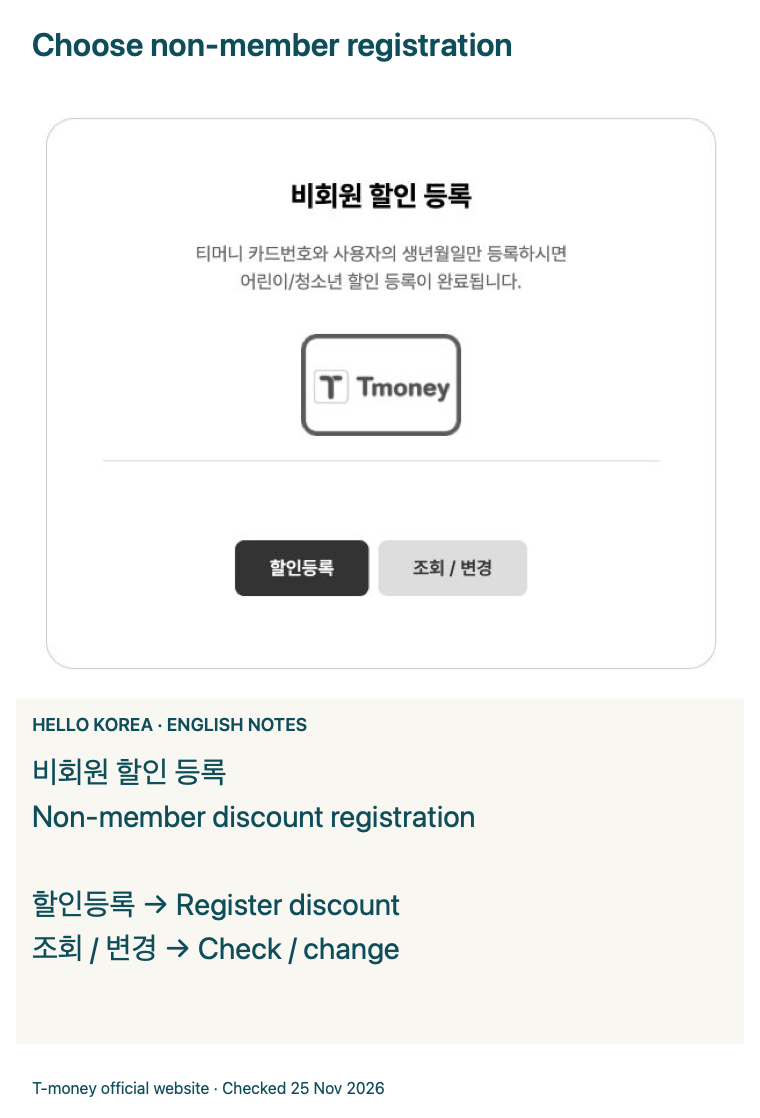
| Korean label | English meaning | What to do |
|---|---|---|
| 비회원 할인 등록 | Non-member discount registration | Use this section for the route without account login. |
| 할인등록 | Register discount | Open the registration form. |
| 카드번호 | Card number | Enter the number of the actual card the child will use. |
| 생년월일 | Date of birth | Enter that child’s birth date in the format requested. |
| 조회 / 변경 | Check / change | Use the separate inquiry/change route for an existing registration. |
Fill in the registration form
- Choose 비회원 할인 등록 → 할인등록. This opens the non-member form; you do not need to start account sign-up.
- Enter the physical card’s number in 카드번호. Type digits only, without hyphens. Use the card that the child will actually carry.
- Enter the child’s date of birth in 생년월일. Use eight digits in YYYYMMDD order, then check the year, month and day.
- Select 등록 — Register. Correct any details the site flags, then wait for 등록 완료 (registration complete) before closing the page.
- To check or change an existing registration, return to the entry page and choose 조회 / 변경 (check/change).
If you’re asked to create an account or verify a phone number, go back and choose 비회원 할인 등록. That’s the option for registering without an account.
If the desktop site asks for a security program
If you see 보안 프로그램 설치 안내, T-money is asking you to install its keyboard-security software.
On Windows, click 수동설치 프로그램 (Download installer). Close your browser, install the program, then reopen the registration page.
The .exe download won’t run on a Mac. You can register at a participating convenience store instead—bring the card and your child’s passport.
Where is child/youth registration in the Mobile Tmoney app?
For the transit card on your iPhone, open Mobile Tmoney and follow these steps:
- Open the ☰ menu.
- Select 교통카드 — Transit card.
- Select the mobile transit card to reveal its management options.
- Tap 어린이/청소년 할인등록 — Child/youth discount registration.
- Check the card and birth date before tapping 할인등록 신청하기 — Apply for discount registration.
The app uses the account holder’s verified birth date. A parent can’t use this screen to enter a different child’s birth date.
For your child’s separate physical card, use the non-member website or ask at a participating store or station. Registering the card on a phone doesn’t register a separate plastic card.
We haven’t tested app sign-up with an overseas phone number. If that’s what you have, the physical card’s non-member website is the route covered in this guide. See also T-money’s mobile-card guidance.
Does every card need registration within 10 days?
It depends on the card and whether the seller registered the birth date:
- An all-age card whose birth date was registered at a listed convenience store or station customer center: that completes discount registration. You do not also need to repeat online registration within 10 days.
- An all-age card from another seller that was changed to child/youth type: register the birth date within 10 days of first use through the official routes.
- A card already designated as a child/youth card: the guide says to register the birth date online within 10 days of first use. Without the required registration, it changes to the standard fare.
Before leaving the shop, ask whether the birth date has been registered. A children’s design on the card or a successful top-up doesn’t tell you whether the discount is active.
Reusing a card or correcting a birth date
You can update the birth date on an existing card through the website, a listed convenience store or a supported station customer center. T-money says a changed birth date takes three business days to be reflected in the discounted fare. Plan ahead if a younger sibling is inheriting a card for a short trip.
The three-day wait applies to birth-date changes. Bank-issued cards may have their own processing times.
Why is the card still charging more than expected?
- The card was only topped up: ask staff to check birth-date registration.
- The wrong person’s birth date was entered: correct it, then allow the published processing period.
- The family mixed up cards: return each card to its registered rider before the next trip.
- The trip goes beyond the base-fare distance: compare the fare for that route, not only the ₩550 base fare.
- The card is a mobile product: use its own discount-registration route. In the iPhone app, registration uses the account holder’s verified birth date.
If the fare still looks wrong, ask station staff to check the card. For earlier trips charged at the adult fare, ask whether a refund is possible.
For purchasing, topping up and refunding remaining balance, continue to our complete T-money guide. For tapping in and out and transferring with your family, see how to use the Seoul subway.
Last checked 25 November 2026. We checked T-money’s guidance and the website and iPhone app screens. We haven’t tested a completed registration or a discounted ride.

Leave a Reply