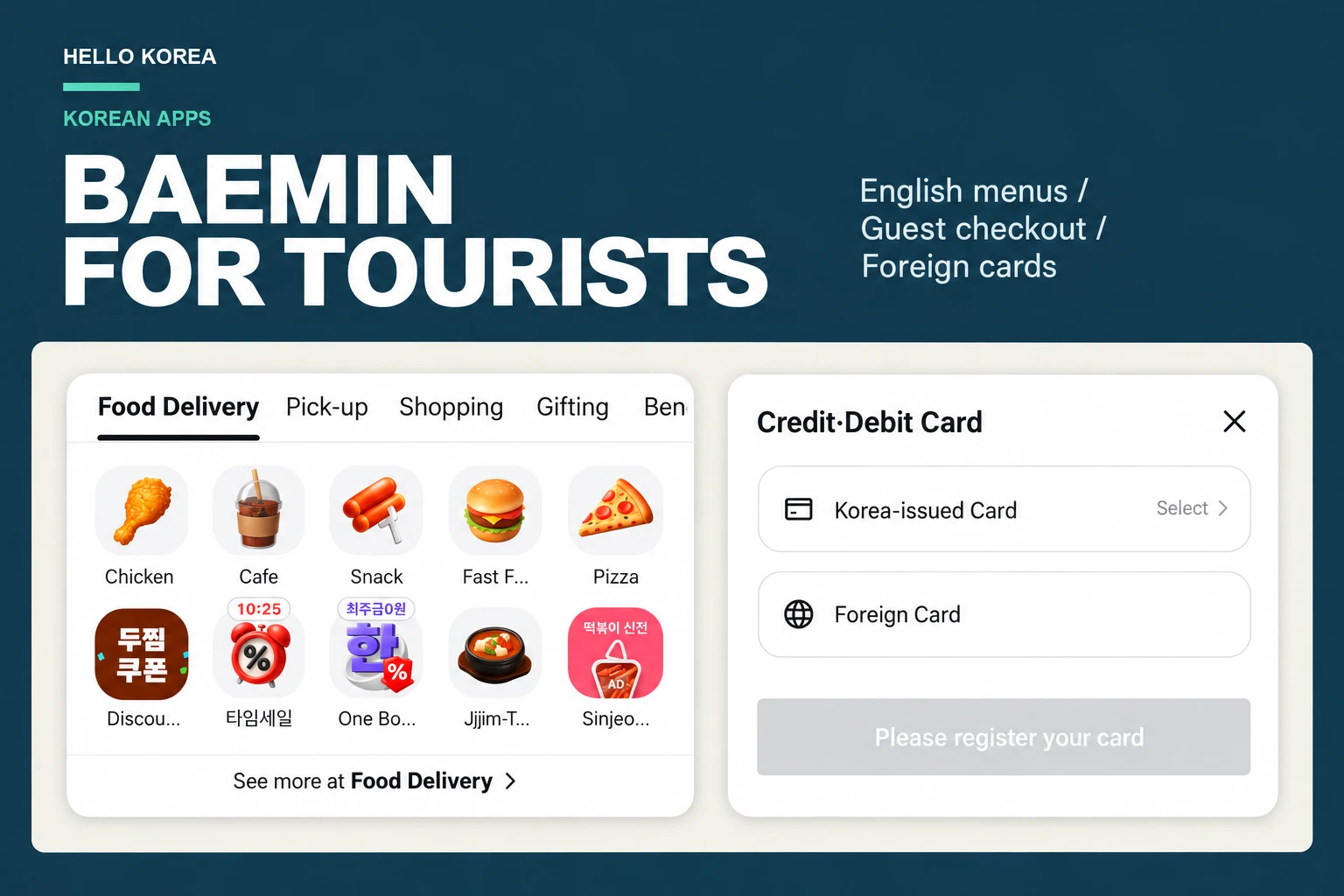
Quick answer: You can get to Baemin’s checkout without making an account. Set the app to English, choose your food and fill in the delivery details. At payment, look for Credit·Debit Card → Foreign Card. You’ll also need a phone number that can receive a verification code—the guest contact form has a country-code selector for overseas numbers.
If you’re working out how to use Baemin as a foreigner, the part that trips people up is that English doesn’t cover every screen. You may find English categories followed by Korean menu choices, or a membership ad that makes it look as though you have to register. Here’s how to work through those screens without accidentally choosing the wrong meal or leaving an old address in the order.
About this guide: I walked through guest checkout on my iPhone 17 in Korea on October 13, 2026, up to the contact form and the Foreign Card selection. One honest caveat: I’m Korean, so I only have a Korean phone number and Korean-issued cards. That means I couldn’t test the two steps that matter most to visitors — receiving the code on an overseas number and paying with a foreign card — so I stopped before verification and payment. I can’t promise those steps will work with every number or card. I also use an iPhone and order to my own home, so Android and hotel delivery weren’t tested either. My address is hidden in the screenshots.
Start by Switching Baemin to English
Open My Baemin at the bottom of the app, then tap the gear icon. Follow Settings → Language Settings → 언어 and choose English. This is the route I used on my iPhone.
If you’re starting from a Korean screen, My Baemin is 마이배민 and language is 언어. Remember those two labels; they make it much easier to find your way through the settings. After changing the language, return to Home and look for Food Delivery.
English ordering is a recent addition, which explains why older guides can give a different impression. Baemin describes its February 2026 multilingual release in its official engineering blog. The same release added Japanese and Chinese alongside English. For the rest of this guide, follow the labels on your own screen if an update has moved something.
Keep a Translation App Handy
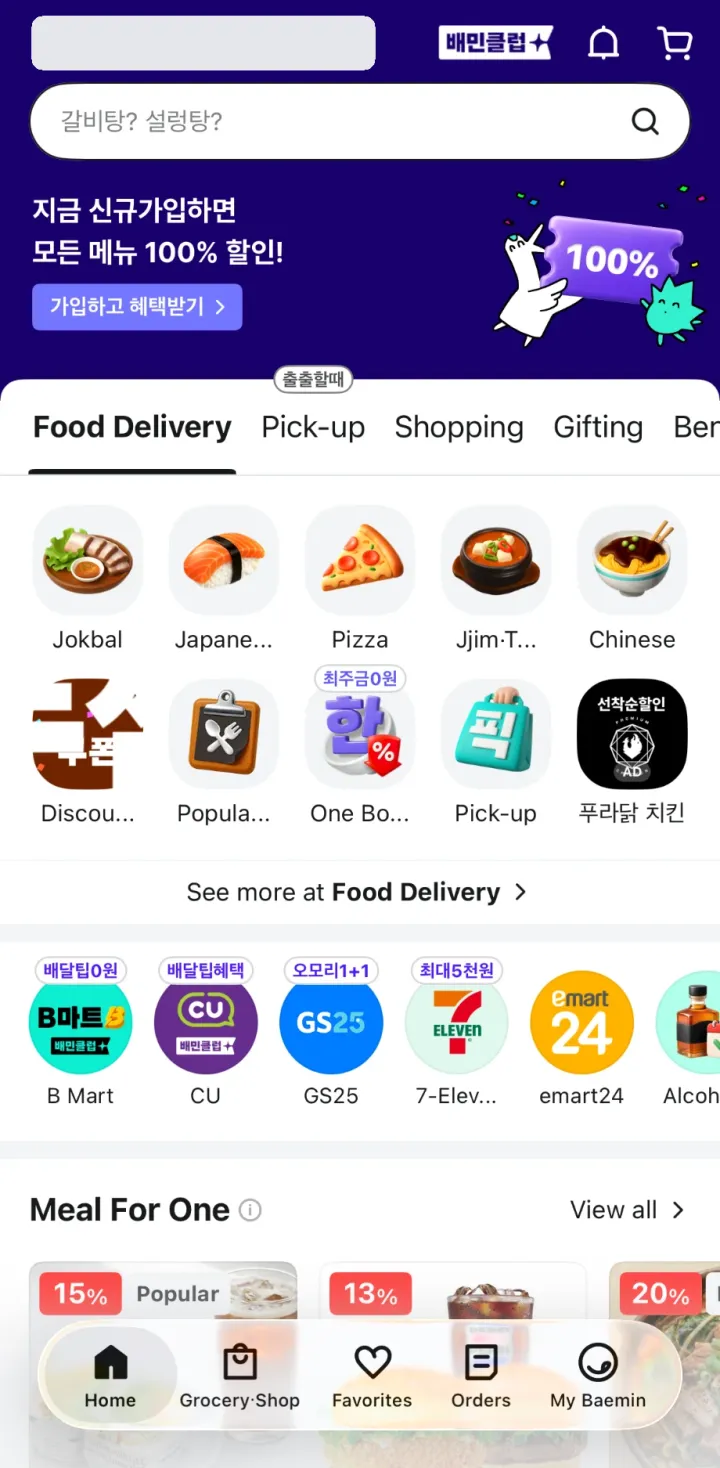
You’ll still run into Korean. In my walkthrough, the food categories and much of checkout were English, while promotional banners and the pizza’s options stayed Korean. That doesn’t necessarily mean the language change failed.
For a short menu, translating a screenshot is usually easier than trying to type each Korean word. Pay attention to required choices: they can be the size, crust, sauce or an extra that changes the price. If you have an allergy, ask the restaurant about the ingredients before ordering. A translated menu description is a starting point, not a reliable ingredient check.
You Can Browse and Reach Checkout Without Signing In
Don’t feel you have to create an account just because a signup offer fills the screen. I closed the offer and carried on choosing food while logged out.
To check your own login status, open My Baemin. If it says Sign in and get benefits, you’re browsing as a guest. Go back to Home to continue. You don’t need to sign out if you already have an account; I logged out only to check the guest route.
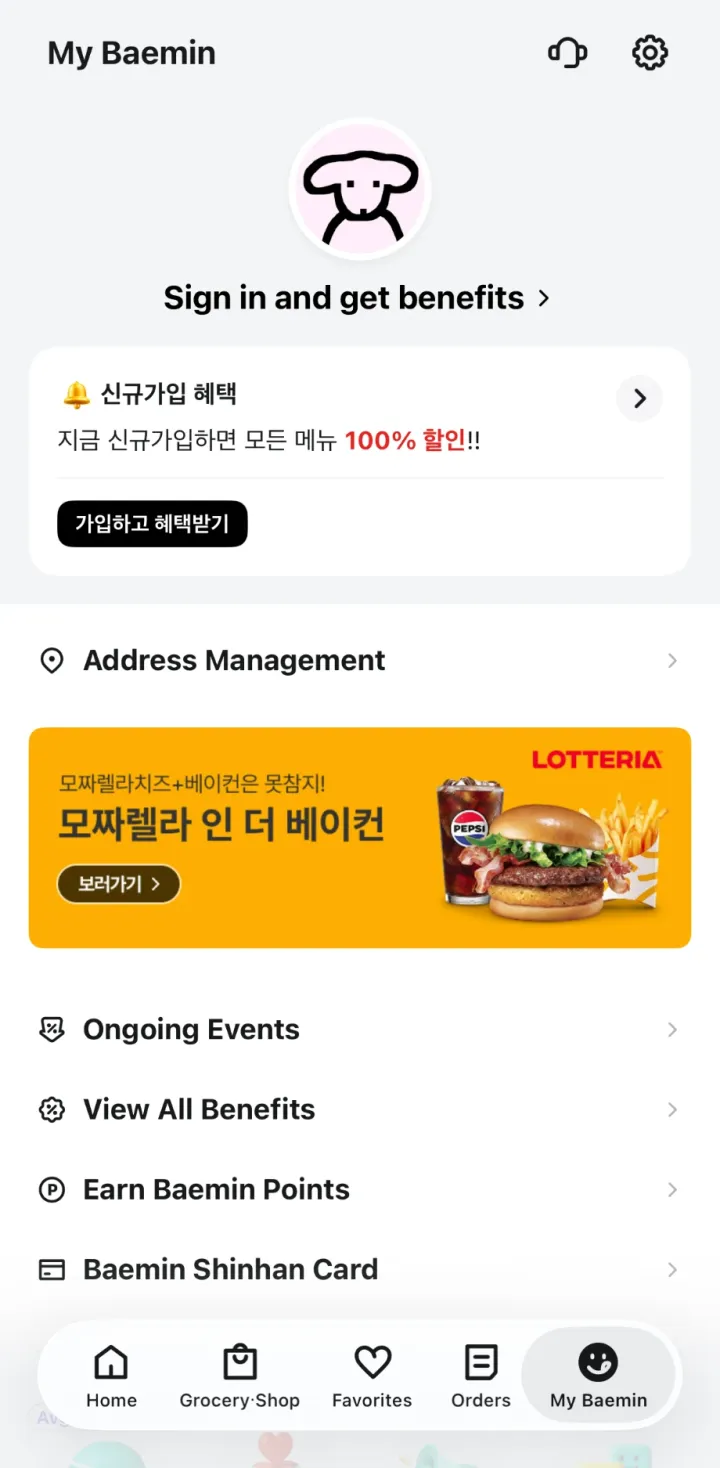
Some extras still need an account. For example, Baemin Pay Money was greyed out at checkout with a login message. You can leave that alone and look at the other payment choices.
The useful distinction is between an account and a contact number. Guest checkout saves you from registering, but it still asks you to verify how you can be contacted. We’ll get to that after the address.
Choose Your Food, Then Read the Options
From Food Delivery, open a category or a restaurant. The selection is tied to your delivery address, so a place someone recommended in Hongdae may not appear if you’re staying in another neighborhood. Restaurants can also disappear from the available list when they close.
Before you spend time choosing toppings, check the restaurant’s minimum order and delivery fee. Then look at the arrival estimate. Those three details tell you more about whether the order will work for you than a large discount banner does.
Watch the Price When You Add Extras
My pizza had required choices before I could continue. Selecting a recommended combination added extras and raised the total. A bundle can be convenient, but check what it includes rather than choosing it just to get past a Korean screen.
If a message tells you to complete an option, look for the highlighted section. Pick the size or other required choice, then check the total again. Adding a side or changing the crust can make the final price quite different from the one on the restaurant list.
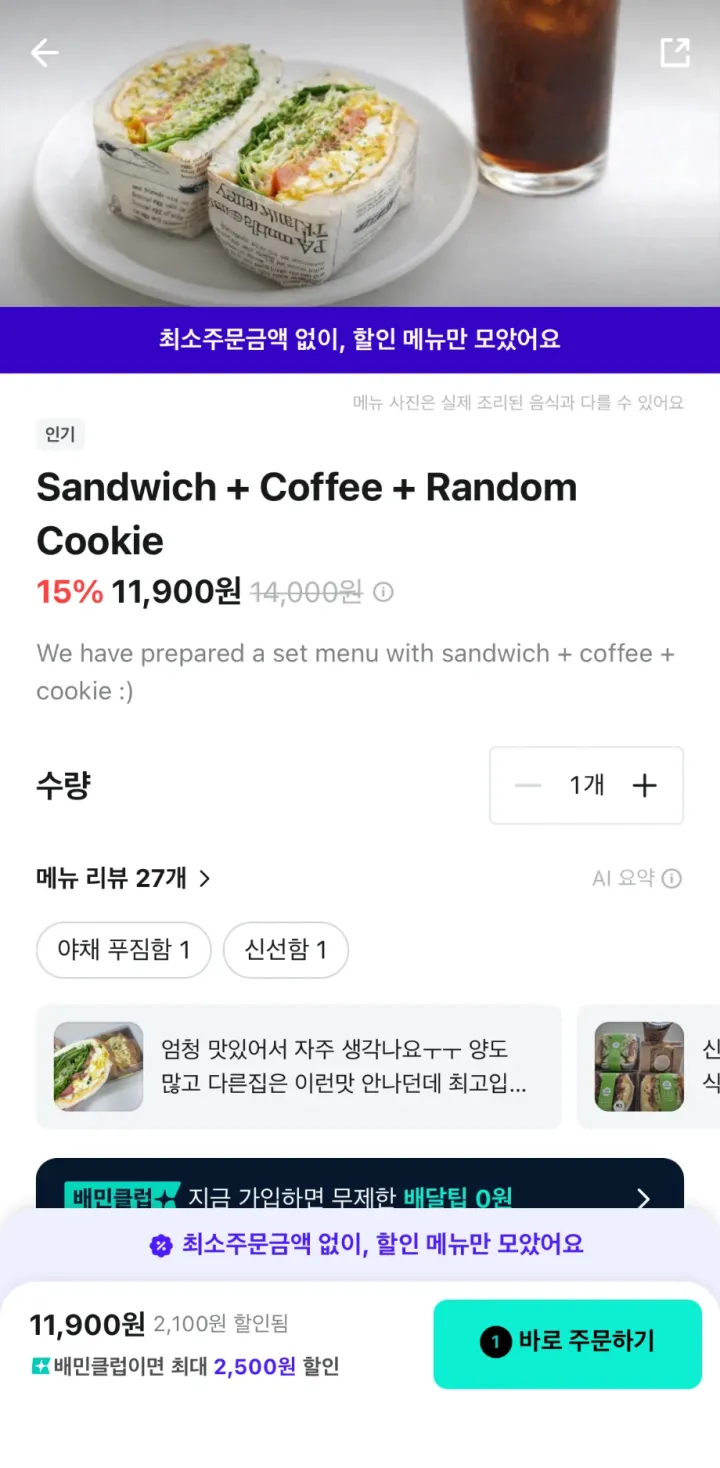
On the promotional pizza I opened, the next button was 바로 주문하기, roughly “Order now.” It took me to the checkout details after the options were filled in. The later Pay button is the one to treat as the payment step. Button wording can differ between menu screens, so read the page you arrive on before continuing.
Make Sure the Food Is Going to the Right Address
This is the first thing I’d check on the order screen. Open Delivery Address and read the whole address, including any building or room details. My old saved address was still there after logout. If you’ve changed hotels, don’t assume the app has caught up.
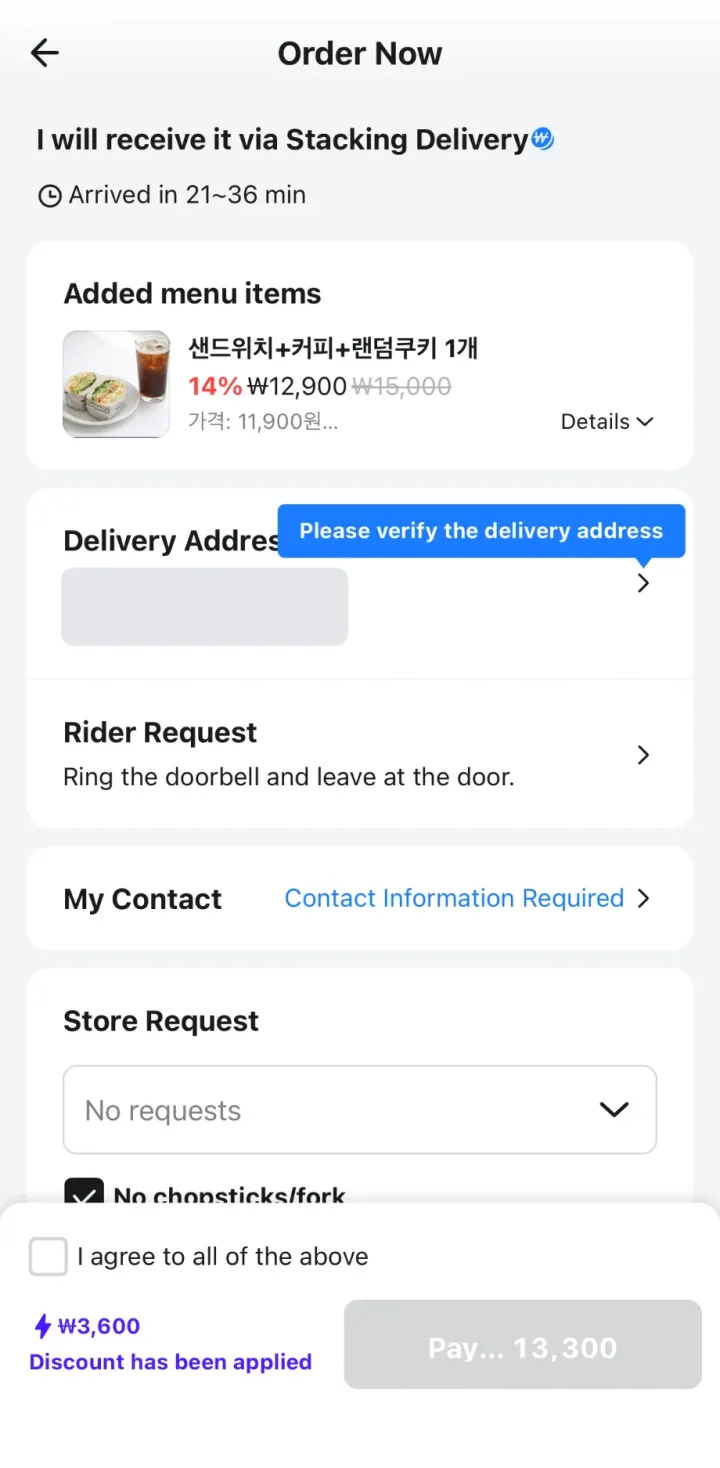
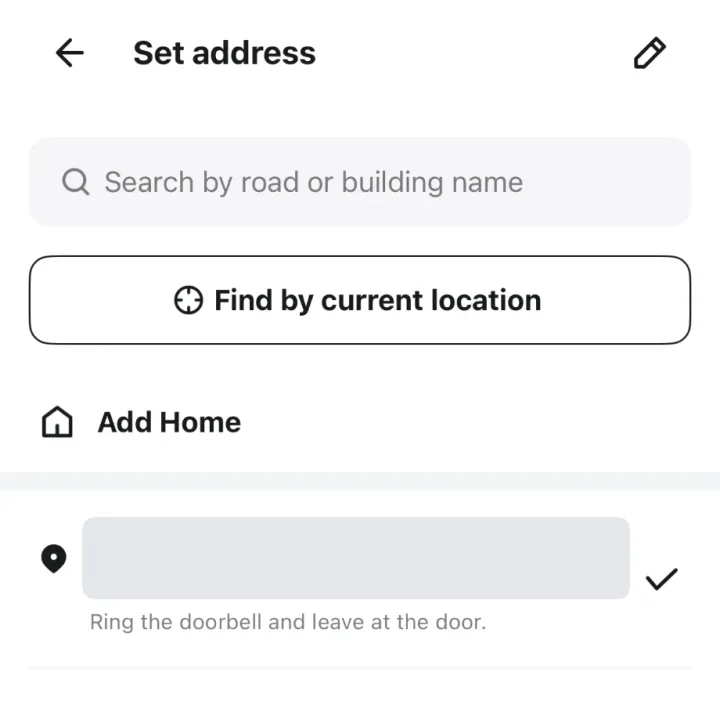
Use the Korean address supplied by your accommodation when you can. It gives you something exact to compare with the app, particularly when an English hotel name has several spellings. Our Korean address guide explains the road name, building number and other parts.
At a Hotel, Arrange the Handoff With Reception
Ask reception where you should meet the driver: the lobby, the entrance or another collection point. It’s much easier to sort that out before the food arrives. Also check whether the hotel accepts deliveries and whether a driver can enter the building.
Read Rider Request rather than leaving the default untouched. Mine said to ring the doorbell and leave the food at the door. That might suit an apartment, but it could send a hotel driver to an entrance they cannot access.
Keep the hotel’s name and Korean address handy while waiting. Room details help only after the driver has reached the correct building; they won’t fix a wrong street address.
Enter a Number That Can Receive the Verification Code
Tap My Contact when you see Contact Information Required. The form starts with South Korea’s +82 code. If you’re using an overseas number, open that dropdown and look for your country before entering the number.
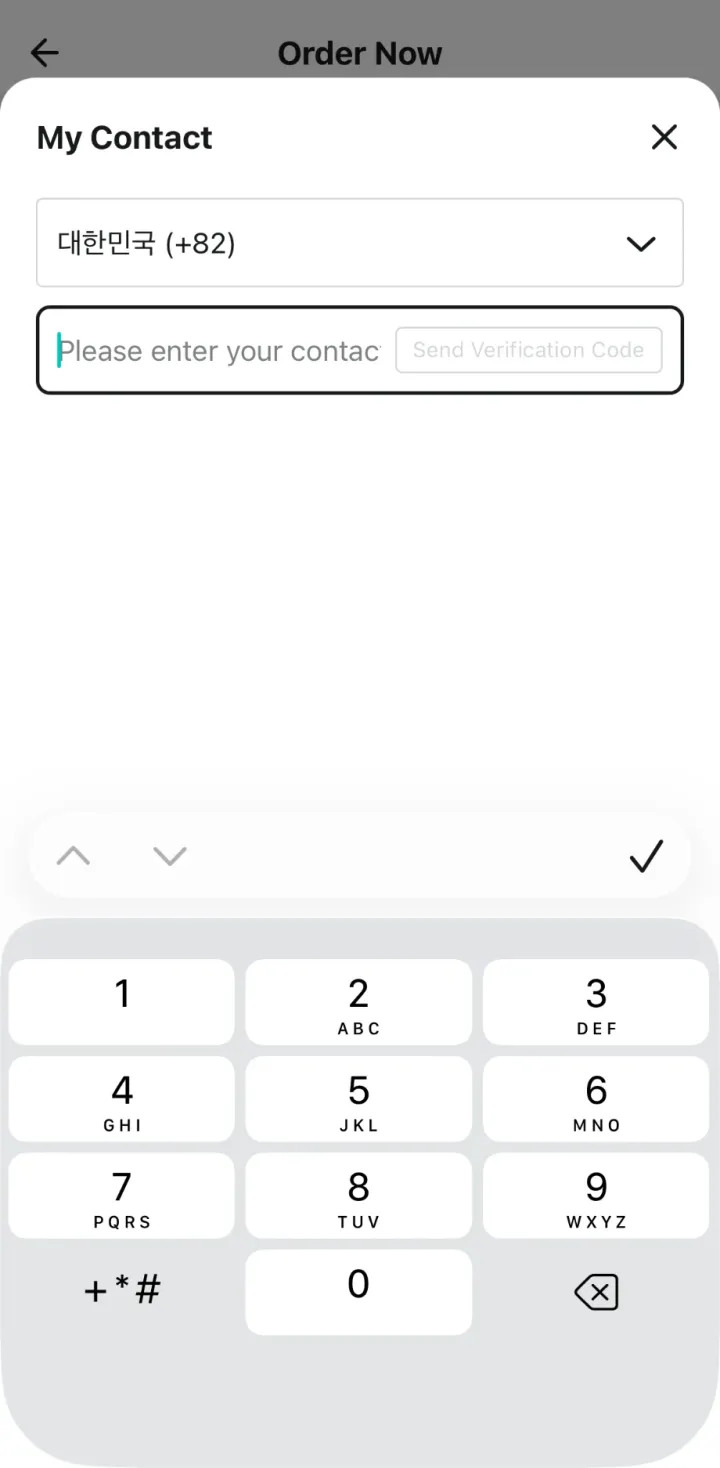
The dropdown includes international dialing codes. You can see several overseas entries below, rather than a field restricted to Korean numbers.
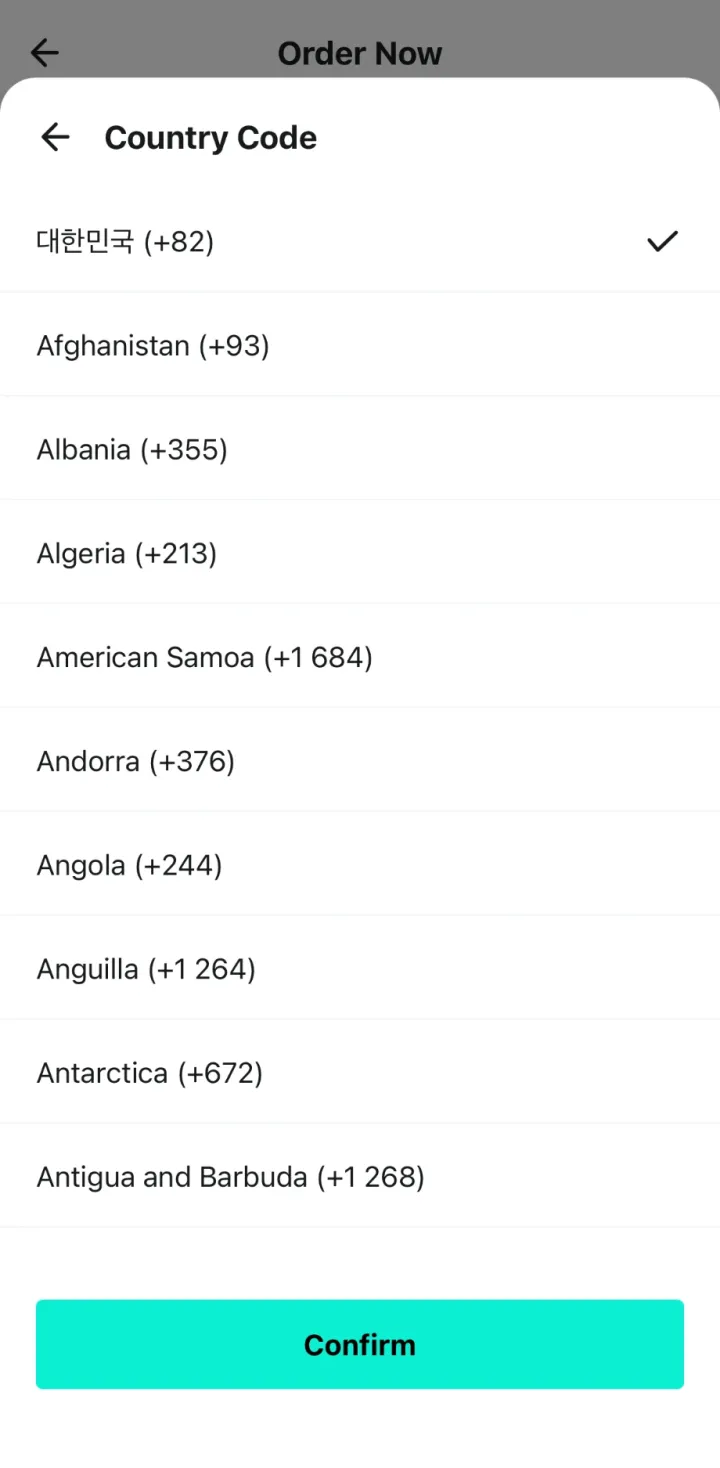
Check Your SIM Plan Before You Rely on It
A data-only travel eSIM can load Baemin, but it doesn’t give you an SMS number by itself. If you plan to use your home number for verification, check whether it can receive messages while you’re in Korea.
Use a number you can actually answer or receive messages on. Don’t borrow a random number just to fill the box. If the code doesn’t arrive, check the selected country, number format and message reception with your carrier before starting over.
I opened this form but didn’t send a code — as a Korean, I don’t have an overseas number to test with. An overseas country appearing in the dropdown is useful, but it doesn’t settle whether a particular carrier will deliver the message. If you cannot get through verification, move to an alternative instead of assuming a new Baemin account will fix it.
Choose Foreign Card at Checkout
Under Payment Method, tap Credit·Debit Card. That opens a choice between Korea-issued Card and Foreign Card. Choose Foreign Card if your card was issued outside Korea.
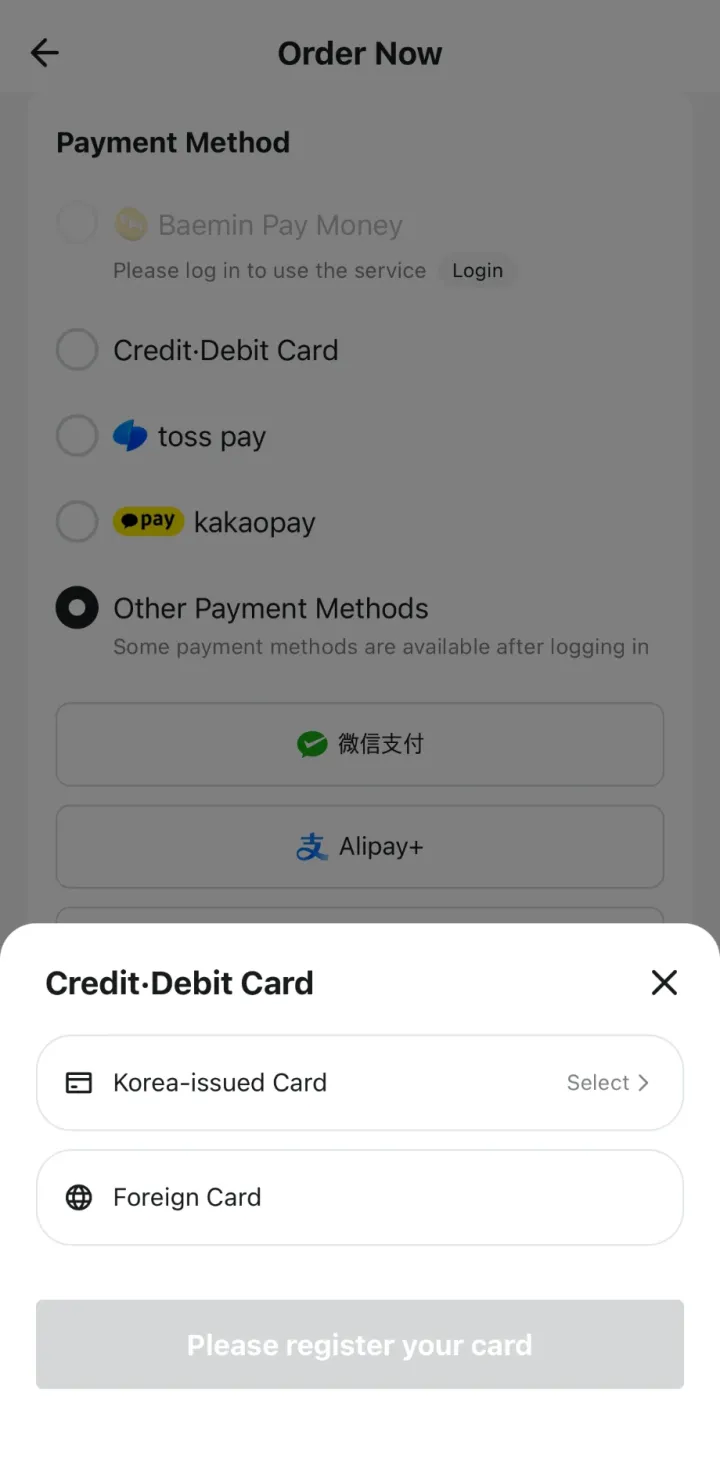
Until you tap Foreign Card, the button at the bottom stays grey — in my screenshot it reads Please register your card. Then tap Selection Completed to return to the order screen. You should now see Foreign Card beside Credit·Debit Card. That’s the selection I reached without logging in.
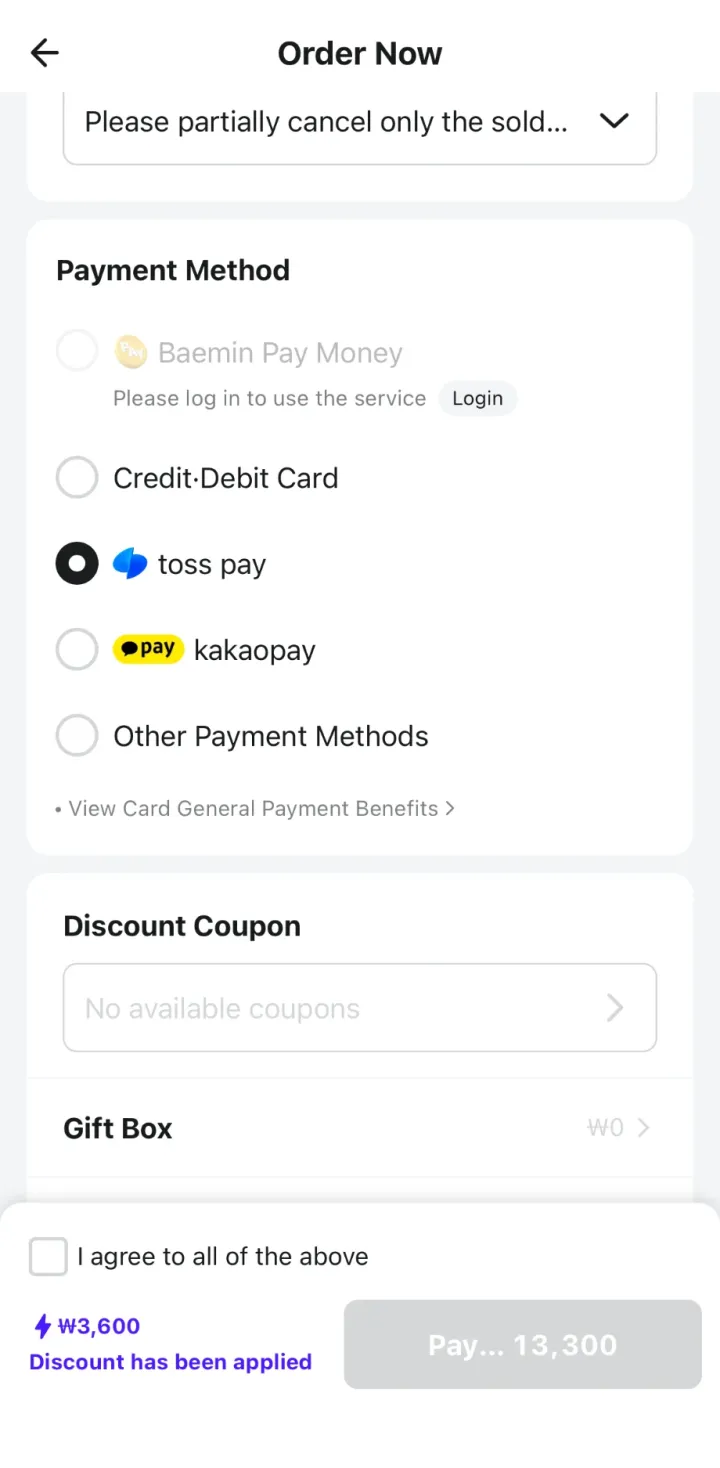
You don’t need to work through the Korean wallet options to find this route. They are separate payment services, with their own requirements. Start with the foreign-card option if that’s what you brought for your trip.
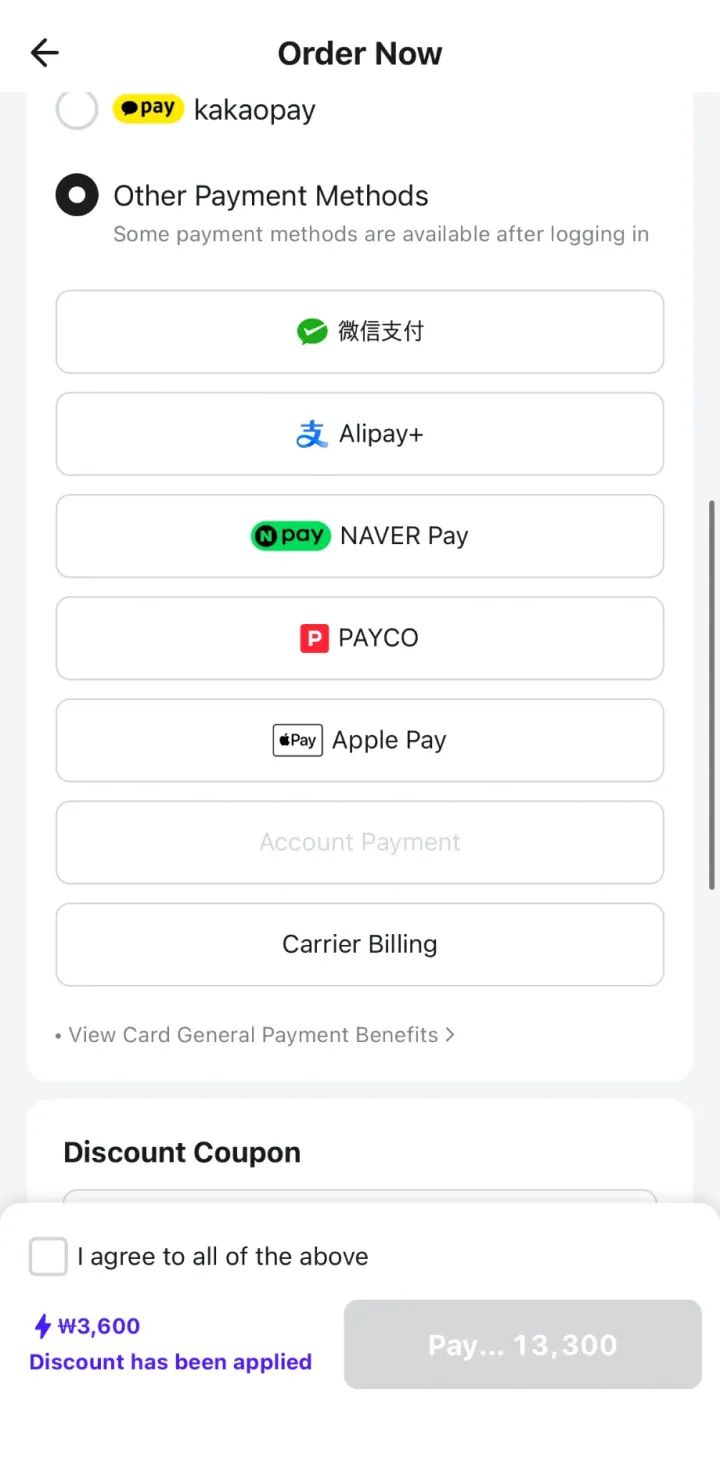
If you open Other Payment Methods as a guest, the list also showed WeChat Pay (微信支付), Alipay+, NAVER Pay, PAYCO, Apple Pay and Carrier Billing, with Account Payment greyed out and a note that some methods need a login. I didn’t test any of them — some may still need an account or a Korean card — but if you already use WeChat Pay or Alipay+, it’s worth a look.
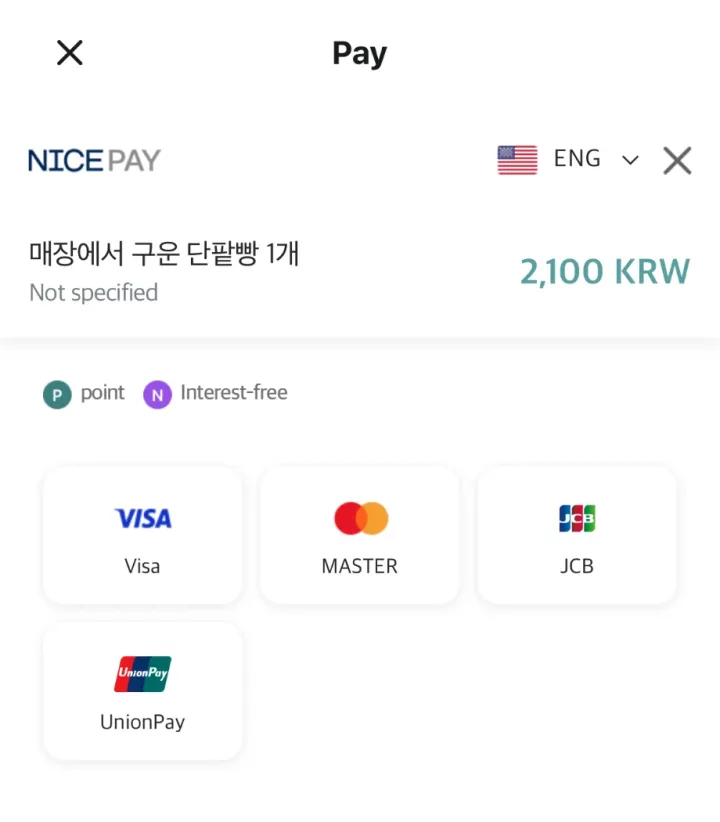
When I continued to payment with Foreign Card selected, a NICEPAY page opened in English, listing Visa, Mastercard, JCB and UnionPay. The amount is shown in Korean won.
Choosing a brand opens a form for the card number, expiry date, cardholder name (type it exactly as it appears on the card), installments and email. Leave installments on Lump sum unless you know your card supports Korean installment plans.
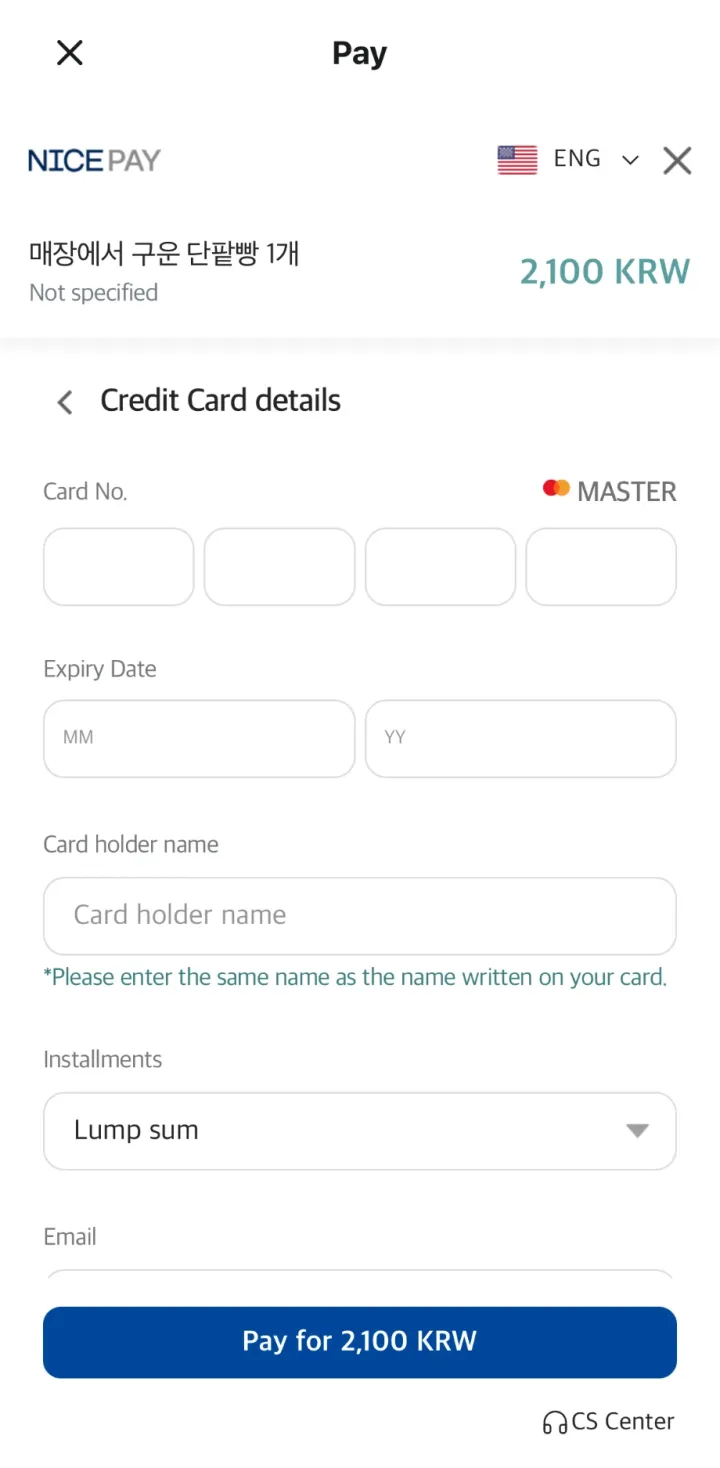
I stopped before entering card details, because I don’t have a foreign-issued card to test with. The option is there, but a payment can still depend on your card issuer and any authentication required on the next screen. If your card is declined, follow the actual error message; changing the app language won’t resolve an issuer’s refusal.
Give the Order One Last Check
Before paying, read the meal name, quantity, selected options and total together. Make sure the total includes the delivery charge. If a coupon appears, check whether it applies to your order rather than assuming the advertised saving will be deducted.
Then check the address, contact number and Rider Request. It’s worth taking a moment here—especially after switching accommodation or using a saved address. Being able to read the checkout in English makes these details easier to catch.
After a real order is confirmed, keep an eye on its delivery updates and be ready at the collection point you arranged. Use the current arrival estimate in the app. The times and prices in my screenshots belong to that particular session.
If You Get Stuck, Try Another Way to Order
If it’s a Korean menu option, translate that screen. If it’s the verification message, check your number and SMS reception. If it’s a declined card, check the payment error. It helps to name the problem before changing settings that have nothing to do with it.
Shuttle is another option to look at. Korea Tourism Organization’s guide describes English ordering and international-card support. Enter your address first to see whether it serves your area and what restaurants are available; I didn’t test a Shuttle order for this guide.
Your hotel may also be able to help arrange delivery. Ask what they can do and confirm the price and how you’ll pay. If delivery becomes more trouble than it’s worth, a nearby takeaway or restaurant is a perfectly sensible choice.
For the other apps that make a first Korea trip easier, see our Korea travel app list.
Frequently Asked Questions
Is Baemin in English?
You can use English for food categories and much of checkout. Expect some Korean to remain, especially in ads, promotions and menu options.
Do I Need to Make a Baemin Account?
I reached checkout and selected Foreign Card as a guest. Some membership benefits and payment services require a login, but you can skip those while preparing a guest order.
Do I Need a Korean Phone Number?
The guest contact form offers international country codes. You still need to receive the verification code on the number you use. I couldn’t test receiving the code on an overseas number myself, because I only have a Korean number.
Where Do I Select My Foreign Credit Card?
Open Payment Method → Credit·Debit Card → Foreign Card, then tap Selection Completed. That selects the route; it doesn’t charge the card. At the payment step, the NICEPAY page I reached listed Visa, Mastercard, JCB and UnionPay.
Can I Order to My Hotel?
Check that restaurants deliver to the hotel’s exact address, then ask reception where to collect the food. A hotel may have different access rules from an apartment.
Will These Screens Look the Same on Android?
These screenshots are from an iPhone. The labels are useful reference points, but I haven’t checked Android’s settings or checkout.
How to Use Baemin as a Foreigner: Final Checklist
Start with English, take your time over the menu choices and check the address before moving to contact and payment. For a guest order, My Contact and Foreign Card are the two sections to look for. Keep a reachable phone number and a backup way to get dinner handy, and don’t let a signup advertisement send you into unnecessary account setup.

Leave a Reply