Quick answer: To check the Seoul subway last train, search your complete journey in NAVER Map, choose the travel date and last-train option, then read every leg through to your destination. A station’s final departure can be too late for your transfer or can terminate before your stop. Allow time to walk to the platform rather than treating the displayed departure as the time to leave dinner.
Imagine finishing a late meal in Hongdae and heading back to Myeongdong. Finding one more train at Hongik Univ. Station is only half the problem: you still need a service that reaches your interchange and an onward train to Myeongdong. This guide shows how to read that whole journey.
Interface check: NAVER Map desktop and the Korean-language iPhone app were checked on 10 November 2026. English text beside the Korean control names is our translation, not a claim that the app displayed those English labels. The example’s two boarding times were also checked against the official KRIC weekday station timetables. We did not ride the journey or measure the transfer walk; Android and the app’s English interface were not tested.
Three times that mean different things
| Time you find | What it answers | What you still need to check |
|---|---|---|
| Last departure from your station | When the final train leaves on that line and direction | Its actual terminus and whether it reaches your stop |
| Last connection for your whole route | The planner’s final available journey to your destination | Every train, interchange and the selected date |
| Your time to leave the restaurant | When you must begin walking | Street walk, station entry, corridors and time to find the platform |
Do not use a general statement such as “the subway closes at midnight” as your departure plan. Seoul Metro’s official timetable data distinguishes weekdays, Saturdays and Sundays/public holidays, as well as direction and train destination. A scheduled time is also different from a live arrival prediction. Seoul Metro first/last-train data description
Check the Seoul subway last train on NAVER Map desktop
1. Search both stations, including the line
Open NAVER Map and select 지하철 — Subway. Choose 수도권 — Seoul metropolitan area. Enter your starting station in 출발역 입력 — Enter departure station and your final station in 도착역 입력 — Enter arrival station, selecting the matching suggestions. Then use 지하철 길찾기 — Find subway route.
For our example, the Korean search terms were 홍대입구 (Hongik Univ., commonly called Hongdae) and 명동 (Myeongdong). Hongik Univ. has separate suggestions for Line 2, the Airport Railroad and Gyeongui–Jungang. Read the resulting itinerary: choosing a station suggestion does not mean the planner will keep every result on your initially selected line.
2. Select the last train and read the date it returns
The checked desktop results showed 지금출발 — Leave now, 직접설정 — Set manually, and the options 첫차 — First train and 막차 — Last train. Select 막차 and wait for the itinerary to refresh. Read the date, departure time, lines and transfer station again: the result can change from the route shown under Leave now.
Open the displayed date to inspect the calendar. If planning for another night, set the intended date and recheck the returned journey. For a departure after midnight, check the calendar day explicitly: 00:33 on Wednesday is early Wednesday morning, following Tuesday evening. Do not assume a Friday-evening journey has the same result as a Saturday-evening journey.
3. Follow the result all the way to your stop
Read the first boarding time, the line used at the interchange and the final arrival. In our check, Leave now suggested the Airport Railroad through Seoul Station, while the last-train result used Line 2 through Dongdaemun History & Culture Park and then Line 4. That change is why checking only the first station’s timetable is insufficient.
| Example returned in our check | What to read |
|---|---|
| Hongik Univ. → Dongdaemun History & Culture Park → Myeongdong | Line 2 first, then Line 4; follow the transfer signs at the named interchange. |
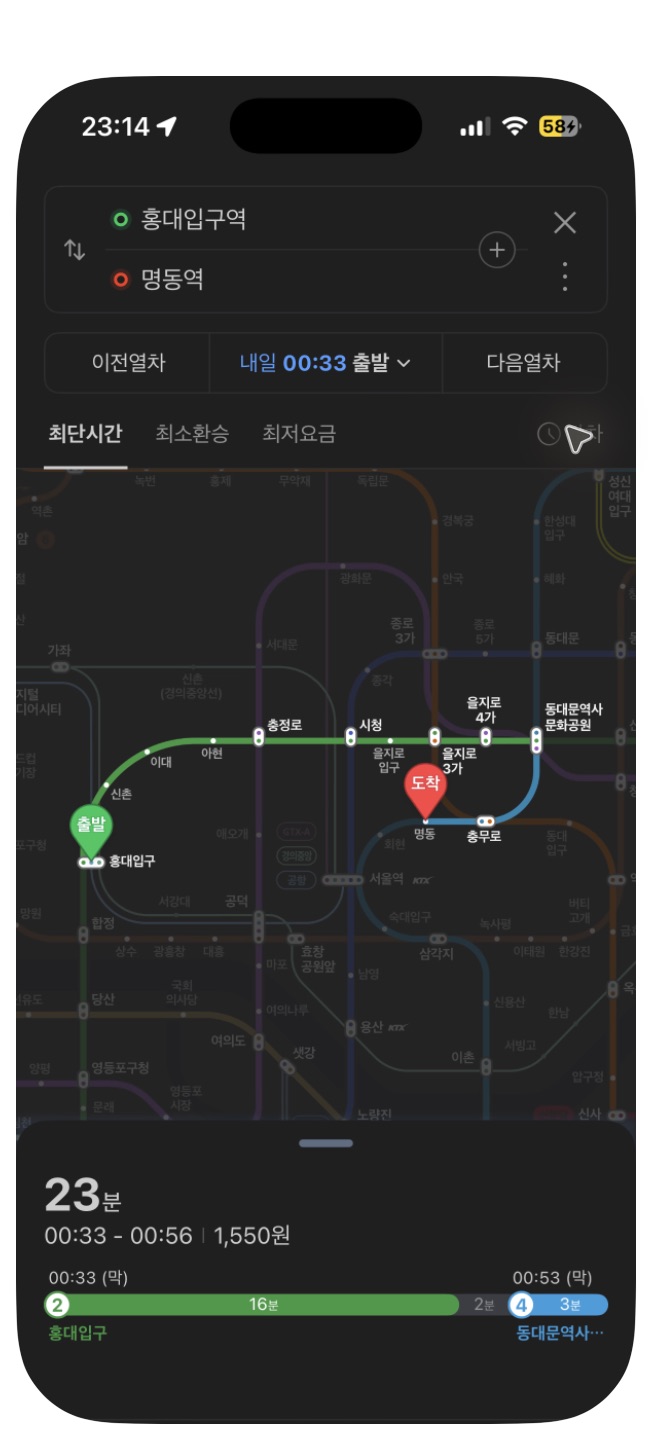
| 11 November, 00:33 → 00:53 → 00:56 | The planner displayed boarding at Hongik Univ., onward boarding at the interchange and arrival at Myeongdong. |
| 23 minutes; one transfer | This is the returned station journey. Add your walk to the station and your final walk to the hotel. |
This is the result returned on desktop and iPhone during our check, not a standing Hongdae-to-Myeongdong schedule. KRIC’s official weekday tables also listed the 00:33 departure at Hongik Univ. and 00:53 departure at Dongdaemun History & Culture Park. The 00:56 arrival and total duration are NAVER’s itinerary estimates. Re-run the search for your own date and leave time for the station walk and transfer.
4. Open the station timetable and check the train destination
The itinerary includes 운행시간 — Timetable controls beside boarding stations. Opening the first one in our example displayed Hongik Univ. Station on Line 2, separate direction columns, and 평일 — Weekdays, 토요일 — Saturday and 공휴일 — Public holidays tabs. The panel also had 첫·막차 — First/last trains.
Match the day and direction, then read the destination attached to the departure. In the checked weekday table, the final Line 2 train toward Sinchon was labeled for Euljiro 1(il)-ga; the earlier last-route result above continued farther to the Line 4 interchange. A train going in the right direction can still stop before the transfer you need.
Check the onward leg too. At the station, compare your planned line, next station and train destination with the platform display. If the service ends before your stop, re-plan before boarding. Our Line 2 inner/outer circle guide explains the direction labels.
Check the last train in the iPhone app
In the Korean iPhone interface we checked, tap the profile button beside the map’s search bar and choose 지하철노선도 — Subway map. Search for a station, select its matching line, open the station name and use 출발 — Departure. Enter your final station in 도착역 입력 — Enter arrival station and select it. NAVER then shows a route between the two stations.
Above the route map, look for 막차 — Last train, to the right of the route tabs. In our check, tapping it changed the departure from a Leave-now journey to 내일 00:33 출발 — Depart tomorrow at 00:33. The route changed to Line 2 through Dongdaemun History & Culture Park, then Line 4, matching the desktop example.
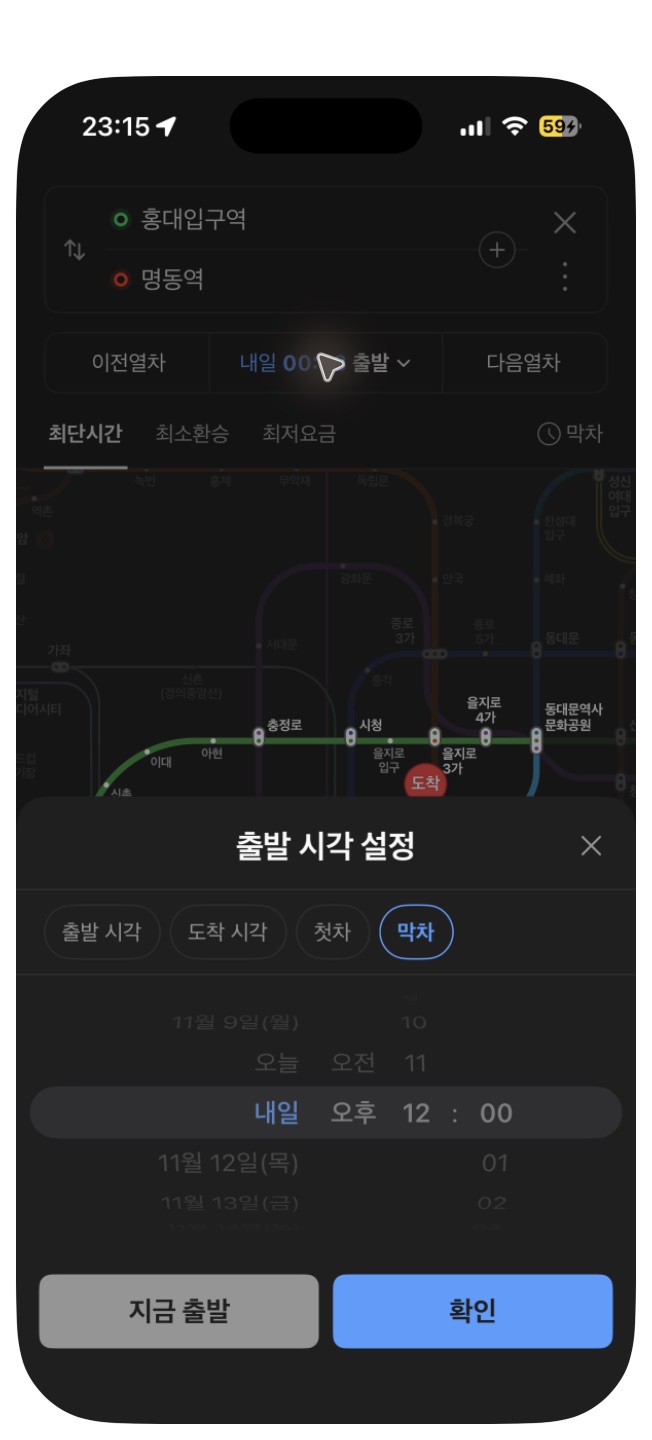
Tap the displayed departure date/time to open 출발 시각 설정 — Set departure time. The checked panel included 출발 시각 — Departure time, 도착 시각 — Arrival time, 첫차 — First train, and 막차 — Last train, plus the date/time selector and 확인 — Confirm. Read the returned calendar date again after applying your choice; in this late-evening check, “tomorrow” meant the early hours of 11 November.
English translations here are reading aids for the Korean screenshots. We checked the Korean iPhone flow; we did not test the same controls in Android or an English-language app session. NAVER’s official mobile help also describes subway-map entry points, date/time searches and station timetable/real-time information. Labels and entry points can change with app version. See our NAVER Map setup guide for the wider setup process.
If the last connection has already gone
Search again from your actual location to your accommodation, using the current departure time. Compare any available bus route with a taxi, including the walk to the stop or pickup point and the walk at the other end. A bus appearing nearby does not establish that it goes to your hotel or is still operating.
If you choose a taxi, have the Korean accommodation name and address ready and use the pickup point you can actually reach. Our Kakao T and k.ride guide explains the booking options. If you are arriving at the airport rather than returning from a night out in the city, use the separate Incheon Airport to Hongdae after midnight guide.
Before you leave: save these five details
- The calendar date and departure time shown in your route.
- Your boarding station, line and direction.
- The actual destination of the train you need.
- The transfer station and onward departure.
- A backup way to reach the accommodation if the connection changes.
A saved screenshot is useful for orientation, but check the live journey again before setting off. Leave time for the station walk and transfer; do not make the final available connection your target if an earlier one is practical. For signs, car-and-door numbers and exits, return to our Seoul subway guide.
Sources and scope
NAVER Map desktop and the Korean iPhone app were checked on 10 November 2026. The 00:33 Hongik Univ. Line 2 and 00:53 Dongdaemun History & Culture Park Line 4 boarding times were cross-checked against the official KRIC station timetable service: choose the metropolitan region, line and station, then 열차시간표 (Train timetable), and match the weekday and destination. The linked Seoul Metro data description explains the day/direction distinctions and scheduled-time limitations. NAVER’s 00:56 arrival remains a planner estimate. We did not field-test the transfer walk or verify disruption-free operation. Android and the app’s English-language flow were not tested.

Leave a Reply